Toolbar
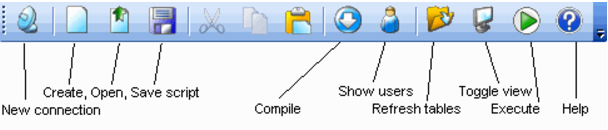
The main toolbar is shown and described below. A second history toolbar is described in the following section.
The new button will create a new connection and window. This connection can be to the same database and user as an existing connection if desired. The script create, open and save buttons all deal with the contents of the edit window. They allow the loading and saving of commands to disk. The procedure compile button will attempt to compile a procedure or function. Any errors will be displayed in the results window. Note, that the compile functionality only works for some databases. The show users button attempts to display the currently logged on database users and the last command they issued. This option only works for some databases and then only if the required privileges have been granted. The results may not be accurate given the dynamic nature of the environment and should be taken as an indication only. The refresh tree view button refreshes the objects in the table pane. This refresh is performed in a background thread. The toggle view button changes between the three pane view and the edit pane filling the whole window. The run button executes the commands in the edit pane.