Examples:
A procedure called get_address has four parameters. The first parameter is a customer number, the second a name, the third a returned address, and the fourth a returned city name. The call may look as follows:
{call get_address(1,'Joe Bloggs',?,?)};
A function called get_customer_id has two parameters. The first parameter is a name and the second an address. The call may look as follows:
{? = call get_customer_id('Joe Bloggs','The Hermitage')};
 TIP
TIP: Some ODBC drivers do not support this functionality. For the Oracle database the 'Microsoft for Oracle' ODBC driver does support the calling of stored procedures. Other ODBC drivers can corrupt the client layer when such commands are issued, resulting in an application crash.
Compiling Procedures
Database stored procedures can be compiled when loaded into the edit pane. This operation is only valid for some databases. To compile a stored procedure select the Sql/Compile PL/SQL menu option or push the blue 'compile a procedure or function' button on the toolbar.
If the stored procedure compiled successfully a message to that effect will appear in the results pane. If the compile failed then an attempt will be made to locate and display the errors in the results pane. The lines in the procedure that generated errors and the error message are displayed.
Executing Sql Blocks
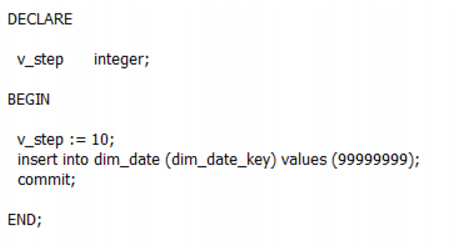
A statement block can be executed when located in the edit pane by selecting the Sql/Execute Statement Block menu option. If the statement block completes successfully then a message to this affect will be displayed in the results pane. If an error occurs then the error will be displayed in the results pane.
An example of an Oracle statement block is as follows:
Executing Historical Statements
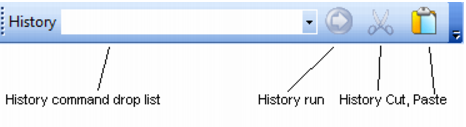
To execute a historical statement select the statement from the drop down history list and the press the blue 'Run shown history command' button.
The example above shows that the statement 'select * from dim_date;' will be executed when the blue run button is pressed.
The results of the statement are displayed in the results pane in the normal manner.
Building Statements from Results
Sql Admin can be used to build up sql statements from the results of other sql statements. For example we may wish to grant access to all of our tables to a new user. We could do this by issuing a statement to list all the table names and use Sql Admin to build up the statements to perform the grants.