Locks Object
This option provides a list of locks showing the object that is locked.
Killing Sessions
For Oracle databases it is possible to use the Sql Admin tool to kill an active session provided that the user has the required privileges. To perform this function proceed as follows:
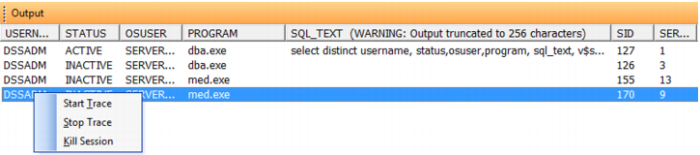
1 Select the menu option System/User Sessions or press the 'Show Oracle users (must be privileged)' button on the toolbar. The results pane will now contain a list of sessions similar to the following screen shot.
2 Select a username in the left hand column of the results pane and using the right mouse menu select the 'Kill Session' option. A prompt will appear asking if you are sure you wish to kill the selected SID, and when accepted the session will be killed. Note, however, that the session may not die immediately. Refer to the Oracle database manuals for more information.
Tracing Sessions
For Oracle databases it is possible to use the Sql Admin tool to start and stop a trace on an active session. To do so proceed as follows.
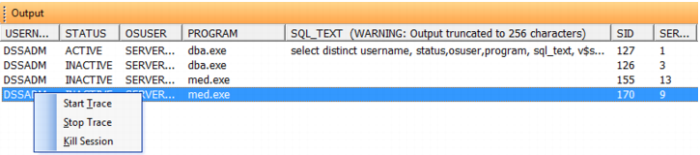
1 Select the menu option System/User Sessions or press the 'Show Oracle users (must be privileged)' button on the toolbar. The results pane will now contain a list of sessions similar to the following screen shot.
2 Select a username in the left hand column of the results pane and using the right mouse menu select the 'Start Trace' option. Tracing will start for the session provided the user has the require privileges.
3 Select the username for the same SID and using the right mouse menu select the 'Stop Trace' option.
4 Locate the trace file for the session. Consult the Oracle manuals on how to find the trace files and on how to process and analyzing these files. Normally the trace files are in the directory $ORACLE_BASE/admin/$ORACLE_SID/udump on the database server system.