Toolbar
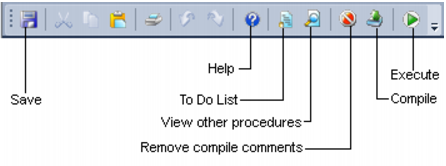
The procedure editor toolbar is shown below:
The save button will write the procedure to the QAD metadata repository in the database. The view other procedures button allows the concurrent viewing of older versions of the current procedure, other procedures in the metadata, compiled procedures in the database and templates. The compile button will attempt to compile the procedure. Once compiled the procedure is stored within the database as well as in the metadata. For Oracle data warehouses, if a procedure fails to compile it is flagged as invalid within the database. The execute button will run a procedure that conforms to the QAD parameter syntax. See the chapter on procedures for more details.
Database Error Messages
From time to time, a SQL error may be raised by QAD Data Warehouse Designer.
These are usually caused by the data warehouse database returning an error.
There are many causes of database error messages being returned to Data Warehouse Designer. The most common include permission issues and invalid SQL statements being run.
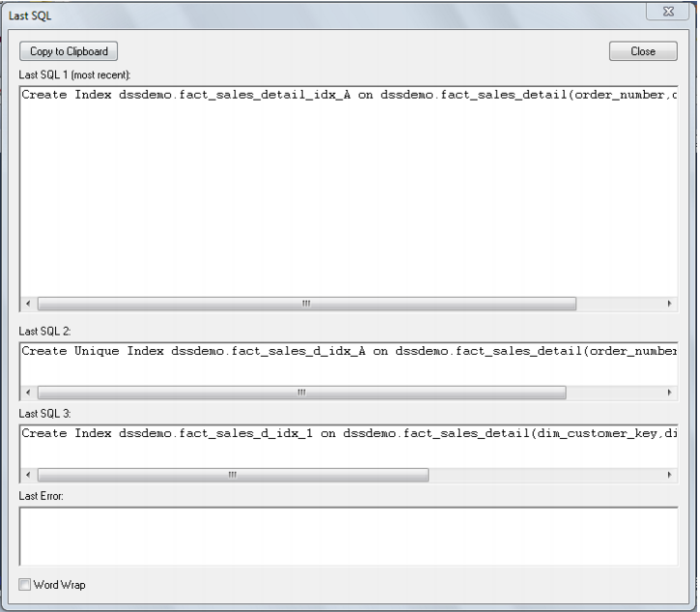
To find the exact SQL statement run by QAD Data Warehouse Designer, go to the View menu and choose Last SQL. The following dialog box will be displayed:
The four fields shown are:
The last SQL statement run
The second to last SQL statement run
The third to last SQL statement run
The error message (if any) from the last SQL statement
In the example above, we have tried to drop a procedure that does not exist. IBM DB2 returned an error telling us Data Warehouse Designer.UPDATE_DIM_KPI does not exist in the database.