General
Set the Table Case Conversion method and the Column Case Conversion method from the drop down lists.
Global Naming of Tables
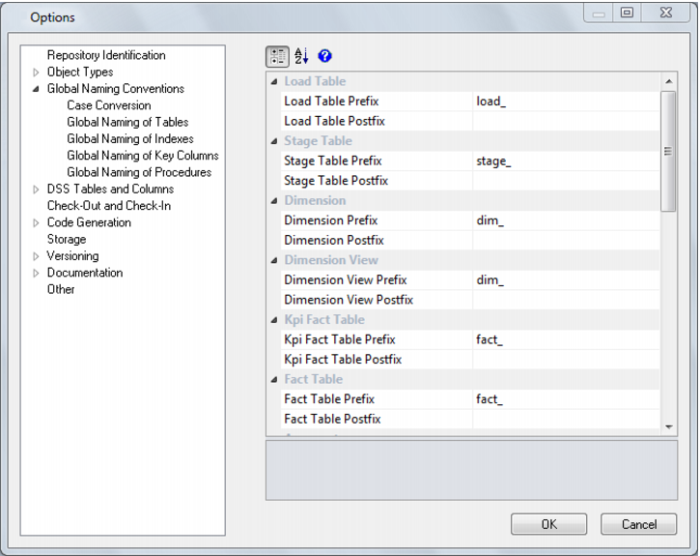
This option allows you to set the Naming of Tables options.
A prefix and/or a suffix string can be applied to an object name. Within Oracle and IBM DB2, a table name may be a maximum of 30 characters long, so these pre and post fix strings should not be more than eight characters long (QAD Data Warehouse Designer short names are a maximum of 22 long in Oracle and SQL Server and 12 long in DB2).
From the example screen above, if a source table called 'customer' (with a short name of 'customer') was dragged into a load table drop target then the default name would be 'load_customer'.
The object name defaults shown above are the values that are installed with the base metadata. They can be changed at any stage, however, the change does not affect any existing objects. So, if a new naming regime is chosen any existing objects will need to be renamed through the properties screen of the object.
Global Naming of Indexes
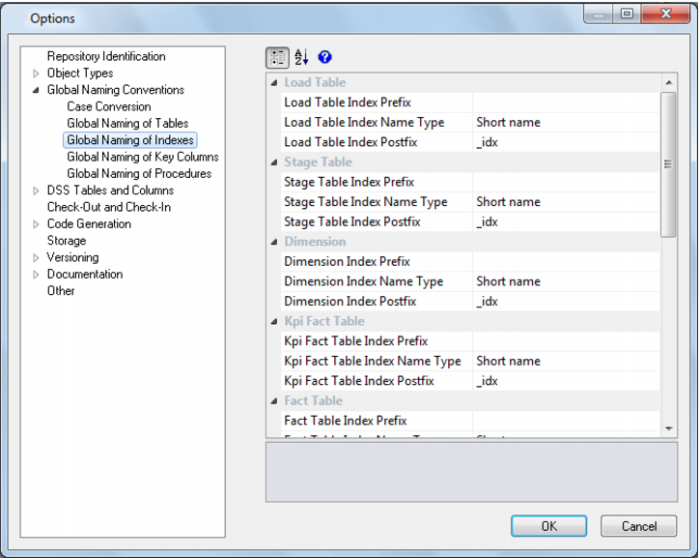
This option allows you to set the Naming of Indexes options.
Whenever a new procedure is defined, QAD Data Warehouse Designer builds or rebuilds a standard set of indexes for the table. These indexes will be created using the standard defined. As with the key naming we can set either a pre-fix or suffix value, or in fact both, as well as choosing the use of either the table name or the short name associated with the table.
In addition to the naming specifications above QAD Data Warehouse Designer will add up to a further 3 characters to the end of the index name. These additional values will be "_0" through "_99", or "_A" through "_Z", or "_SC". When a new index is manually added it will have the additional value of "_x" by default. This should be changed. The QAD Data Warehouse Designer naming standard for indexes is described below, but any valid name may be used.
From the example screen above, a fact table would have indexes generated using the short name and with a suffix of "_idx". Therefore a fact_sales fact table would have indexes such as fact_sales_idx_x.
Ultimate suffix | meaning |
_0 | artificial key |
_1 thru _99 | bitmap key index on dimensional join |
_A | primary business key |
_B thru _Z | secondary business keys |
_SC | key to support slowly changing dimensions |
Global Naming of Key Columns
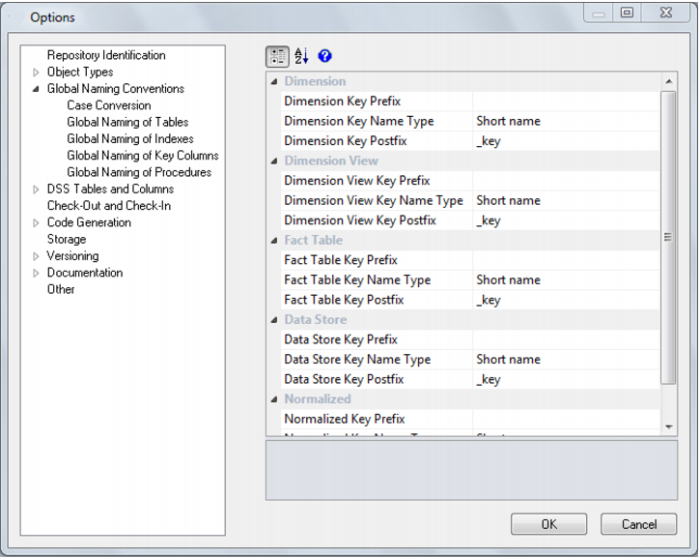
This option allows you to set the Naming of Key Columns.
During the drag and drop generation of new dimension and fact tables, QAD Data Warehouse Designer will build an artificial (surrogate) key for the table. The naming convention for that key can be set through the same menu option as above. As well as potential pre-fix and suffix values, we also need to choose between the inclusion of the full table name, or the short name assigned to each table.
In the example screen above, which is the default, a dimension table key would use the table short name and have a suffix of "_key". So our load_customer table example would generate a key called dim_customer_key if it where dragged into a dimension drop target
Global Naming of Procedures
The default naming conventions for generated procedures can be set through the menu option Tools/Options. To generate a procedure select the (Build Procedure...) option from the update procedure drop list found in the table properties screen.