Procedure name defaults
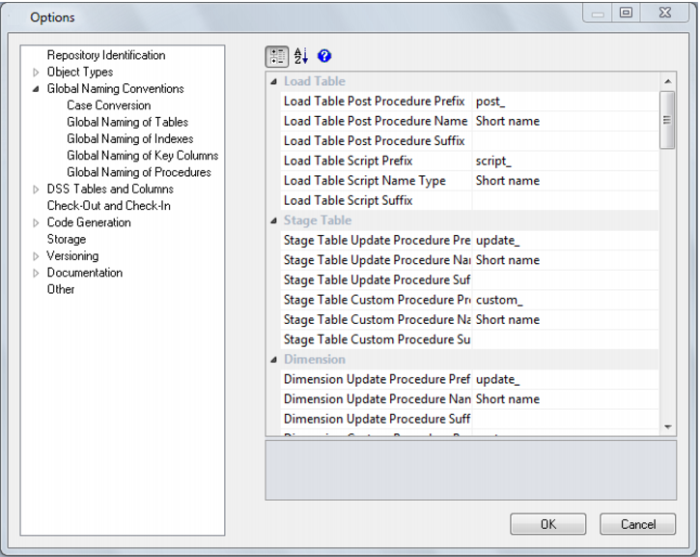
The dialog shown in the screen shot below will appear in response to the tools/procedure name defaults menu option. It provides a means of setting the naming defaults for all types of generated procedure. The values as shown below are the default settings, but may be changed to meet the site requirements. The only restriction is on the size of the resultant name, which is database dependent.
The contents of the prefix and suffix fields must contain characters that are valid in a database stored procedure name and should preferably not contain spaces.
The 'name type' may be either the full table name or the unique short name assigned to each table. In the case of smaller table names the short name is usually the same as the table name.
For example if we have a dimension called dim_product, then from the example screen above the three possible generated procedures would be called update_dim_product, custom_dim_product and get_dim_product_key.
Settings - DSS Tables and Columns
When building the data warehouse QAD Data Warehouse Designer makes use of a number of special tables and columns. Two tables are used. These are called by default dss_source_system and dss_fact_table and are discussed in detail in the sections below.
The special columns used are defined in the table below.
Column name | description |
dss_source_system_key | Added to support dimensions that cannot be fully conformed, and the inclusion of subsequent source systems. See the section below for more details. |
dss_fact_table_key | Used in composite rollup fact tables to identify the source fact table that contributed the particular row. |
dss_create_time | Indicates when a dimension record was created. |
dss_update_time | Indicates when the record was last updated in the data warehouse. Used in the updating of rollup fact tables and aggregate tables. |
dss_count | Applied to fact tables. Provides a simple row count variable that can be used by end user tools. |
dss_current_flag | Used for slowly changing dimensions. This flag identifies the current record where multiple versions exist. |
dss_version | Used for slowly changing dimensions. This column contains the version number of a dimension record. Numbered from 1 upwards with the highest number being the latest or current version. It forms part of the unique constraint for the business key of a slowly changing dimension. |
dss_start_date | Used for slowly changing dimensions. This column provides a date time stamp when the dimension record began life. If null then it was the first record. It is used to ascertain which dimension record should be used when multiple are available. |
dss_end_date | Used for slowly changing dimensions. This column provides a date time stamp when the dimension record ceased to be the current record. It is used to ascertain which dimension record should be used when multiple are available. |
All of these special columns and tables may be renamed through the Tools/Options/DSS Tables and Columns menu option. The columns can simply be renamed, but the tables however require valid table names that meet certain criteria. See the appropriate sections below.
Note: When using table names other than the defaults for dss_source_system and dss_fact_table it is worth considering the fact that by default the metadata backups will include any table that begins with "dss_". Therefore if a table is used it is recommended that it have a name starting with "dss_". The advantages are that a working meta repository will be established through a backup and restore if these tables are included in the backup set.