Parameters
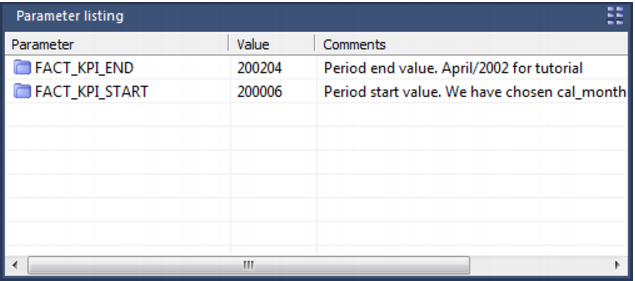
Parameters are a means of passing information between two or more procedures and between the QAD Data Warehouse Designer environment and procedures. They can be edited within the QAD Data Warehouse Designer environment by selecting the Tools/Parameters menu option. A list of parameters is displayed as per the example below:
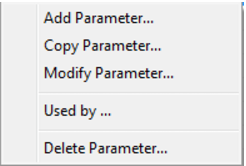
A parameter can be added, edited, copied or deleted by using the right mouse menu in the Parameter column:
Typical parameter usage may be the global definition of how many days should be looked back for changed data, a month or processing period etc.
Parameters can be used in
load tables to place limits in a
Where clause, etc. See
Database Link Load - Source Mapping (on page
237) for more information.
They are also used by
stage table procedures as variables. See
Generating the Staging Update Procedure (see "
Generating the Data Store Update Procedure" on page
370) for more information.
IBM DB2: Two procedures are provided to allow procedures to read and write parameters. These procedures are
WsParameterRead (on page
896) and
WsParameterWrite (on page
907). Using these procedures a procedure can load and use the contents of a parameter, or modify an existing parameter, or add a new parameter.
Oracle: Two functions are provided to allow procedures to read and write parameters. These functions are
WsParameterRead (on page
896) and
WsParameterWrite (on page
907). Using these functions a procedure can load and use the contents of a parameter, or modify an existing parameter, or add a new parameter.
SQL Server: Two procedures are provided to allow procedures to read and write parameters. These procedures are
WsParameterRead (on page
896) and
WsParameterWrite (on page
907). Using these procedures a procedure can load and use the contents of a parameter, or modify an existing parameter, or add a new parameter. A function
WsParameterReadF (see "
WsParameterRead" on page
896) is also provided. This function will return the value of a parameter.