Index build logging
DB2 only. Specifies the degree of logging performed by DB2 when creating, recreating and re-organizing indexes. Value is one of not selected, NULL, OFF or ON. Not selected and NULL are the same. The table is created without this option and then altered to add this property. The default is not set (no alter takes place). The following describes the values:
NULL - Database parameter logindexbuild determines whether logging is minimal or full.
OFF - only minimal logging occurs.
ON - all operations are logged.
Table Storage Screen - SQL Server
Table Storage Screen - Oracle
Typical Storage Tab for an Oracle Table:
Storage Tab for an Oracle Dimension Table:
Table Storage Screen - DB2
Table Notes
The notes screen is used to enter notes against QAD Data Warehouse Designer objects. The notes on an object are included in the QAD Data Warehouse Designer documentation. Up to 4000 characters of information can be stored in the Notes field.
By default, the Notes field is enabled for all object types.
Notes can be removed from the documentation via the Tools/Options menu.
Table Notes Screen
Table Documentation Fields
Each table has a set of associated documentation tabs. These are used to store descriptive metadata about the fact table and how it is used. The contents of each tab appears in the generated documentation. Their order and placement can be customized in the generated documentation using the Tools/Options menu.
The following tabs are available to store additional informational metadata that will appear in the generated QAD Data Warehouse Designer documentation:
Purpose
Concept
Grain
Examples
Usage
Note: These names of the tabs are completely arbitrary and can be changed in the generated documentation using Tools/Options menu, Documentation tab. By default, these fields are not enabled for load and stage tables, but can be enabled using the Tools/Options menu, Documentation tab.
Up to 4000 characters of information can be stored in each field.
Some or all of these fields can be removed from the documentation via the Tools/Options menu.
Table Documentation Fields Screen
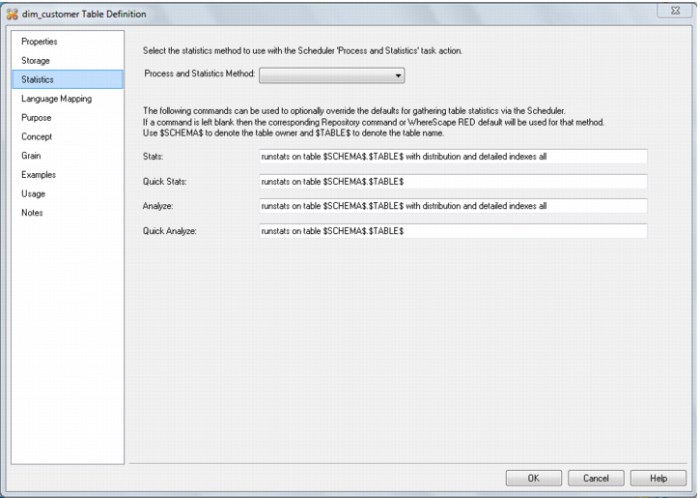
Table Statistics in DB2
QAD Data Warehouse Designer for DB2 allows for table level statistics definition. Four different statistics commands may be defined for a table:
Stats Full
Stats Quick
Analyze Full
Analyze Quick
These are arbitrary names, used as actions in the scheduler.
To set the command that is run for one of the actions above, enter the command to be run using the $SCHEMA$ and $TABLE$ variables.
Note: The variable $SCHEMA$ allows for metadata portability between environments. Variable $TABLE$ avoids any requirement to change the command if the table is renamed.
For example: enter runstats on table $SCHEMA$.$TABLE$ to do basic statistics for the table.
If a particular statistics field is left blank, then the QAD Data Warehouse Designer default statistics options are used.
The default statistics method is the statistics method used in the scheduler if the chosen action is Process with default stats.
Table Statistics Screen
This screen shot shows the default values; but if these fields are left blank, then the default values will be used.