Creating a File Action
To create a file action:
1 Click on the File Actions tab of the load table properties dialog.
2 Click the Add new action button.
3 Choose After load from the Action Type drop down list.
4 Enter the Action Description.
5 Choose the Action Program from the drop down list (see above for the options).
6 For action programs of copy... and move..., enter the target directory name.
7 For copy data files and move data files, optionally enter the file's new name.
8 Click on Save/update action.
9 Repeat if necessary for additional file actions.
10 Click OK.
File Action Example
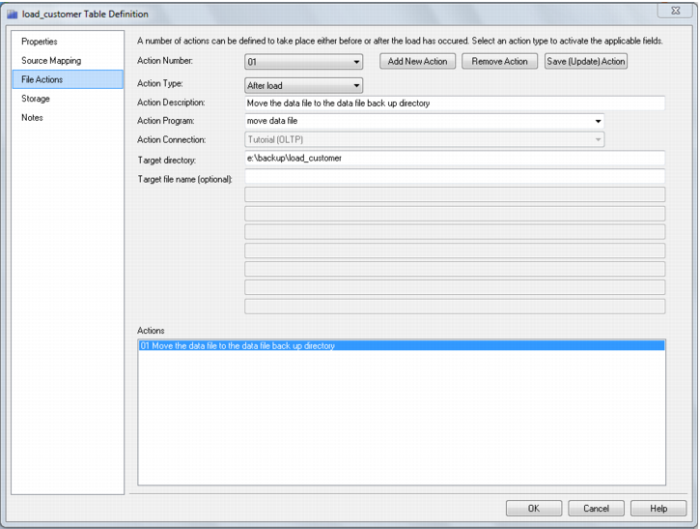
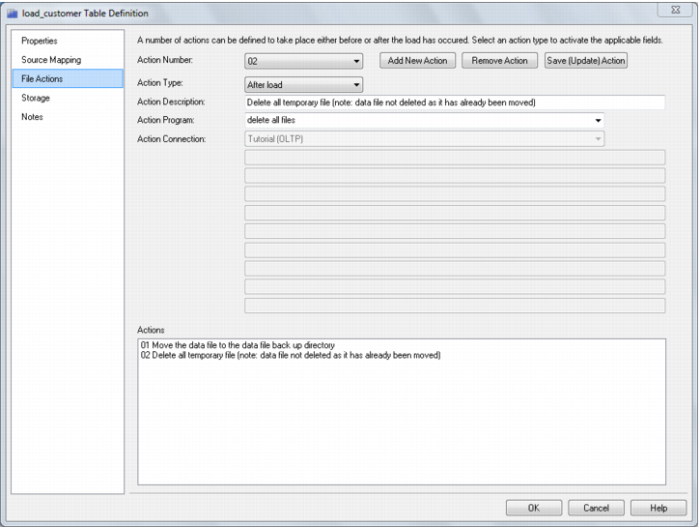
The following example moves the Native ODBC Load data file to another directory then deletes all temporary files.
Note: The data file is not deleted as it has been moved prior to the delete action.
Sample move data file file action:
Sample delete all files file action:
Flat File Loads