Columns parsed
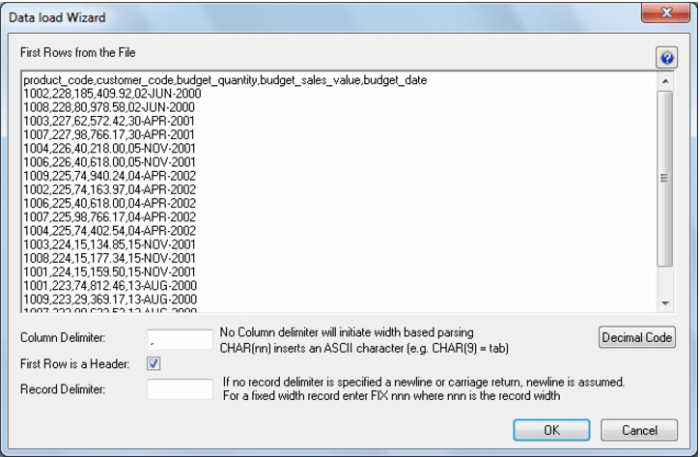
QAD Data Warehouse Designer attempts to parse the columns. You will be asked for details and for the column delimiter. You then step through the columns providing names and data types. QAD Data Warehouse Designer attempts to guess the data type, but it needs to be checked and the field length will probably need to be adjusted. The following screen shot shows the initial file parsed screen.
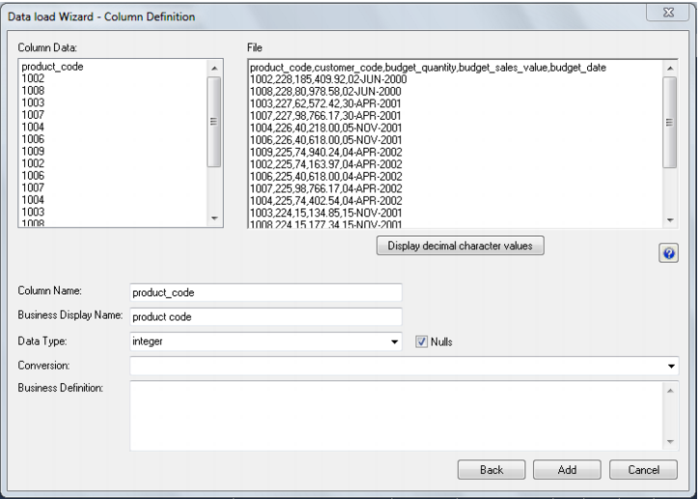
The 'decimal code' button (toggle) will show the decimal value of each character in the lines retrieved from the source file. These decimal codes will be shown below each line and are green. Once the screen above is completed a screen will appear to allow the breakdown of the source data into columns. If no delimiter is entered then width based parsing is assumed and an addition width size is prompted for. Use the Back button to revert to the previous column if an incorrect width or delimiter is entered. The following screen is an example of the file parsing technique.