In line schema definition
The other supported xml construct allows the use of in line schema definitions as produced by the Microsoft FOR XML AUTO, ELEMENTS, XMLDATA query. This will produce one file which contains a Schema element in which the column names and their approximate data types are defined. Because the supplied data types are not concise enough to define the table columns correctly, this method will produce load tables of either data type text for SQL Server or varchar2(4000) for Oracle. The column names are taken from the <element type=”col_name”/> strings within the Schema element. The data elements will be the same as above with the column names making up the start and end tags and the rows being the children of the root element. The file that is produced by the FOR XML query above needs to be changed slightly to comply with the xml standard. Remove everything before the Schema element and then give the file a starting root element and a closing root element.eg <root> and </root>
The xml files can optionally start with an xml pre process statement.eg
<?xml version=”1.0”?>
They may also contain xml comments.eg
<!— comments -->
External Load
For an externally loaded table the only property that is executed is the Post Load procedure.
Any 'After' transformations recorded against any of the columns in an Externally loaded table will also be processed.
Handling Missing Source Columns
Note: This option is only available when running an Oracle data warehouse.
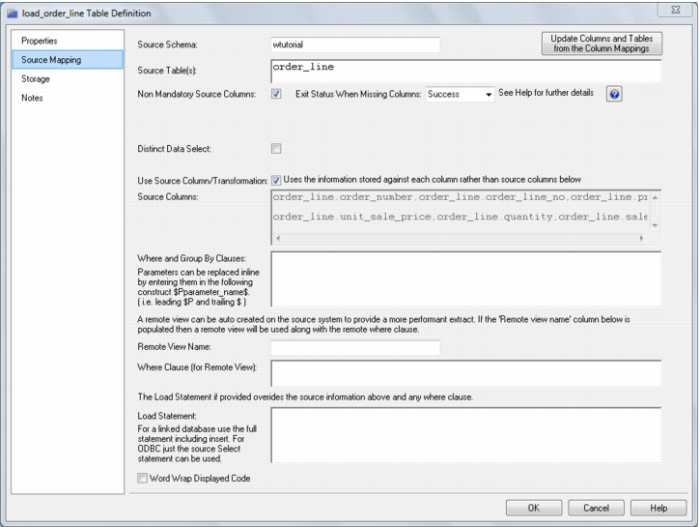
By default a load will fail if a source column that is to be loaded does not exist. This default action can be modified by using the 'Non mandatory source column' feature of a load table. When this feature is enabled the load process will check all source columns, and if any are found to be missing will replace those missing columns with a Null value (which can be changed, see below).
On the 'Source Mapping' tab of a load tables properties there are two check boxes and a drop down list that we will cover in this section. See the following example: