Lookup
If multiple source tables were used to build the dimension then an option would have appeared in an earlier dialog to choose between a join or a lookup. If 'Lookup' was chosen then a dialog box will appear prompting for the joins between the primary table and each secondary (lookup) table.
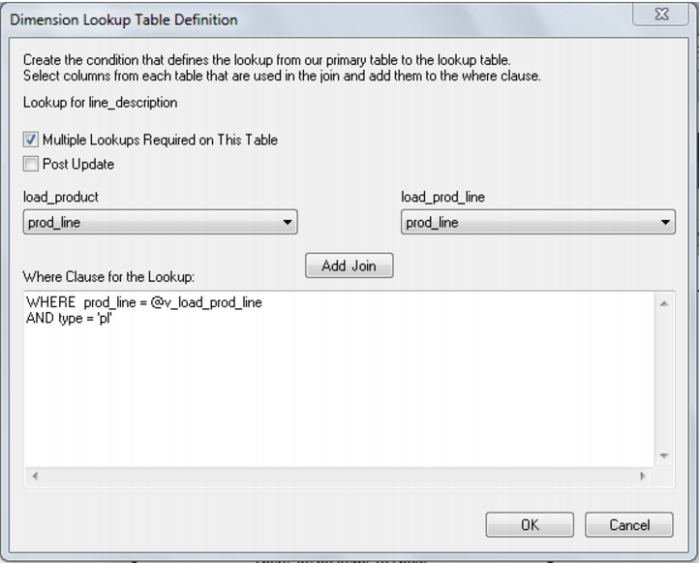
The example below shows the lookup dialog for two tables from the tutorial data set.
The load_product table is the main table and a lookup is being performed on the load_prod_line table. Columns are selected from the drop down column list for each table and then the 'Add Join' button pressed to add these two columns to the 'Where' clause as shown in the bottom box. This 'Where' clause may be edited and goes to form a 'lookup' select statement within the main cursor loop of the update procedure. In this example the 'Where' clause has had the second line manually added to identify the type of lookup in the code table.
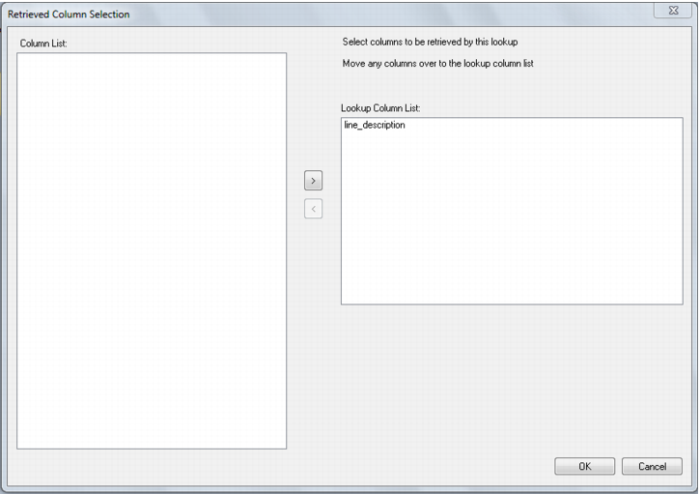
Multiple lookups can occur on the same table. Where we have a generic code table, for example, we may do multiple lookups to get descriptions. The check box 'Multiple lookups required for this table' will result in repeated lookups against the second table until all columns sourced from this table have been utilized in the lookup statements. If the 'Multiple lookup...' check box is ticked then the following dialog will appear to allow selection of the columns that are to be retrieved by the lookup.