Indexes
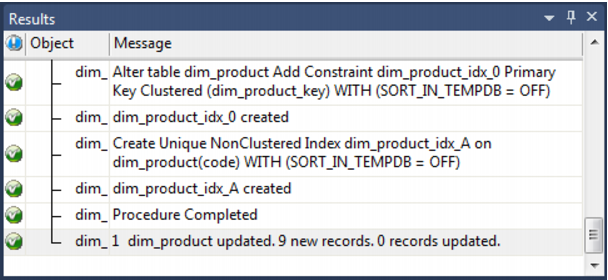
By default a number of indexes will be created to support the dimension. These indexes will be added once the procedure has been built. An Oracle example of the type of indexes created is as follows:
This example shows three indexes being created. They are:
1 A primary key constraint placed on the artificial key for the dimension.
2 A unique index placed on the business key for the dimension.
3 A unique index placed on the business key and a slowly changing column from the dimension.
This third index is only created when a 'Slowly Changing' dimension is chosen.
Additional indexes can be added, or these indexes changed. See the chapter on indexes for further details.
Dimension Artificial Keys
The artificial (surrogate) key for a dimension is set via a sequence in Oracle and an identity column in SQL Server and DB2. This artificial key normally, and by default, starts at one and progresses as far as is required.
A QAD standard for the creation of special rows in the dimension is as follows:
Key value | Usage |
1 upwards | The normal dimension artificial keys are numbered from 1 upwards, with a new number assigned for each distinct dimension record. |
0 | Used as a join to the dimension when no valid join existed. It is the normal convention in the QAD generated code that any dimension business key that either does not exist or does not match is assigned to key 0. |
-1 through -9 | Used for special cases. The most common being where a dimension is not appropriate for the record. For example we may have a sales system that has a promotion dimension. Not all sales have promotions. In this situation it is best to create a specific record in the dimension that indicates that a fact table record does not have a promotion. The stage table procedure would be modified to assign such records to this specific key. A new key is used rather than 0 as we want to distinguish between records that are invalid and not appropriate. |
-10 backward | Pseudo records. In many cases we have to deal with different granularities in our fact data. For example we may have a fact table that contains actual sales at a product SKU level and budget information at a product group level. The product dimension only contains SKU based information. To be able to map the budget records to the dimension we need to create these pseudo keys that relate to product groups. The values -10 and backwards are normally used for such keys. A template called 'Pseudo' is shipped with QAD Data Warehouse Designer to illustrate the generation of these pseudo records in the dimension table. |
Dimension Get Key Function
When QAD Data Warehouse Designer is asked to generate a new procedure to support the updating of a dimension it also generates a 'Get Key' function (procedure in SQL Server and DB2). Such a function is also generated when dimension views are created, and can be generated for retro-fitted dimensions.
This 'Get Key' function is used to return an artificial key when supplied a business key. The normal syntax is to call the function passing the business key and be returned a status indicating the result of the lookup. On a successful lookup the artificial key for the dimension record is also returned. If the lookup fails because the business key is not found in the dimension then an appropriate status is returned and the artificial key is set to 0.
Note: Two parameters exist on the generated 'Get Key' function that allow manipulation of the process. It is possible to automatically add a new dimension record when a match is not made. It is also possible to record the lookup failure in the detail/error log. By default both these options are disabled.