Outer Join
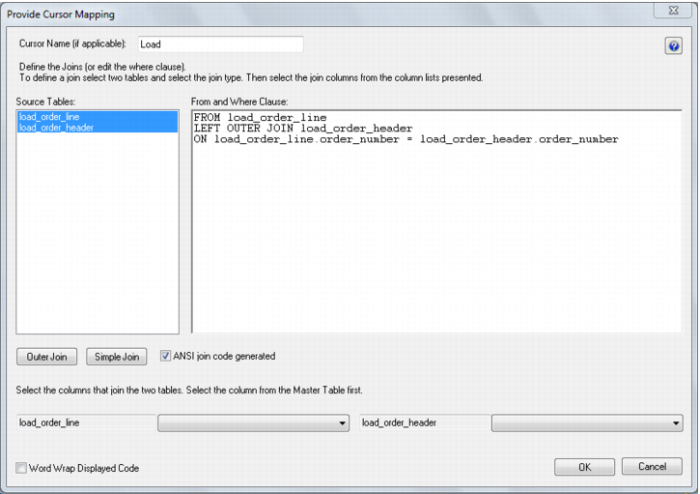
An outer join joins the two tables, and returns all rows in the master table regardless of whether or not they are found in the second table. So if the example above was executed with table A as the master table then 100 rows would be returned. 76 of those rows would have null values for the table B columns. When QAD Data Warehouse Designer builds up the where clause for Oracle it places the outer join indicator (+) at the end of each line. As this indicator goes on the subordinate table, it must be that table whose column is selected last. In the example screen above the table 'load_order_line' has had its column chosen and the column for the table 'load_order_header' is currently being chosen. This will result in the statement as shown in the 'Where clause edit window'. The results of this select are that a row will be added containing order_line information regardless of whether or not an order_header exists.
As the join columns are selected the 'Where' statement is built up in the large edit window on the right hand side. Once all joins have been made the contents of this window can be changed if the join statement is not correct. For example the Oracle outer join indicator (+) could be removed if required.
Once satisfied with the 'Where' statement click the OK button to proceed to the next step. As indicated in its description this statement is the where clause that will be applied to the select statement of the cursor to allow the joining of the various source tables. It can of course be edited in the procedure that is generated if not correct.
For SQL Server data warehouses you have the choice between 'Where' statement joins and ANSI standard joins. For DB2 data warehouses, only ANSI standard joins are available.
Note: 'Where' joins will not work correctly in SQL Server if more than two tables are used in an outer join.
The example below shows the result of an ANSI standard join which takes place in the 'From' statement.