Parameters
The procedure must have the following parameters in the following order:
|
Parameter name
|
Input/Output
|
Oracle Type
|
SQL Server/DB2 Type
|
|
p_sequence
|
Input
|
Number
|
Integer
|
|
p_job_name
|
Input
|
Varchar2
|
Varchar(256)
|
|
p_task_name
|
Input
|
Varchar2
|
Varchar(256)
|
|
p_job_id
|
Input
|
Number
|
Integer
|
|
p_task_id
|
Input
|
Number
|
Integer
|
|
p_return_msg
|
Output
|
Varchar2
|
Varchar(256)
|
|
p_status
|
Output
|
Number
|
Integer
|
The input parameters are passed to the procedure by the scheduler. If the procedure is called outside the scheduler then the normal practice is to pass zero (0) in the sequence, job_id and task_id. A description of the run can be passed in the job name and the task name is typically the name of the procedure.
The output parameters must be populated by the procedure on completion. The return_msg can be any string up to 256 characters long that describes the result of the procedures execution. The status must be one of the following values:
|
Status
|
Meaning
|
Description
|
|
1
|
Success
|
Normal completion
|
|
-1
|
Warning
|
Completion with warnings
|
|
-2
|
Error
|
Hold subsequent tasks dependent on this task
|
|
-3
|
Fatal Error
|
Hold all subsequent tasks
|
Procedure Properties
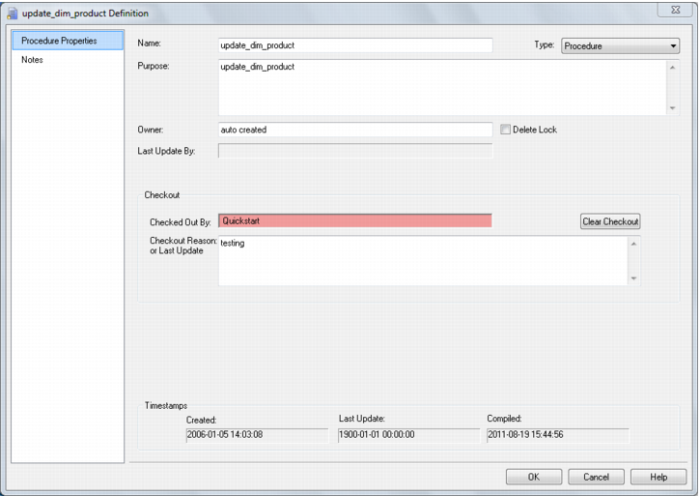
The properties screen for procedures and scripts is the same. A procedure can be renamed by changing the name field. If renamed then it will also be necessary to change the procedure name within the actual code. The purpose and owner fields are purely informational.
In the example above the Delete Lock check box is checked. This will prevent the procedure being deleted through the 'delete' menu option. It will also prevent the procedure being overwritten if a new procedure generation is requested.
Also in the example above the procedure is currently being edited, and is shown as being checked out. A button to the right of the check out message allows the check out to be cleared. If QAD Data Warehouse Designer, the database or the PC crashes when a procedure is open, then the check out will need to be cleared through this screen.
The check out reason is for information only, and can be used as another comment field if desired.
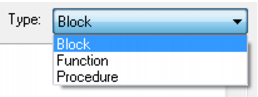
The Type drop list allows the selection of Block, Function or Procedure:
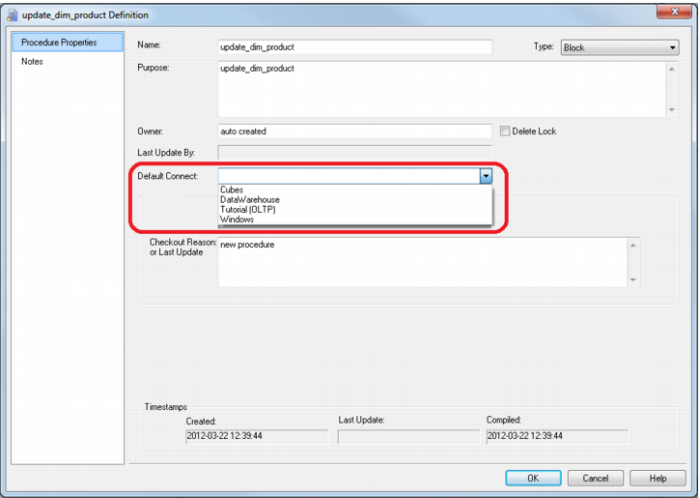
Selecting a type of Block will allow you to execute a SQL block against another connection. An additional field on the Properties screen; namely Default Connect then allows you to select the connection against which the SQL block will be executed.
Script Generation
QAD Data Warehouse Designer generates template scripts to assist in the loading of textual files from UNIX or Windows. These scripts are generated when a UNIX or Windows file is dragged into a load table target and one of the two 'Script based' file load options is chosen. Typically script loads are used when some complexity prevents the use of the standard file based load. In such a case the script will probably need modification.
Note: UNIX scripts are only supported for an Oracle data warehouse running on a UNIX platform.
The following sample scripts are covered in the remainder of this section:
1 Windows script for SQL.
2 UNIX script for Oracle.
3 Windows script for Oracle.
4 Windows script for DB2.
Script Generation (Windows/SQL Server)
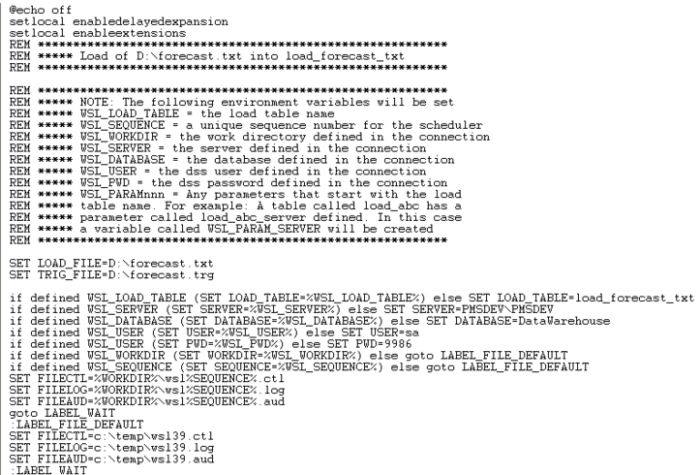
A sample Windows script for SQL Server is as follows. The key components of the script are described below:
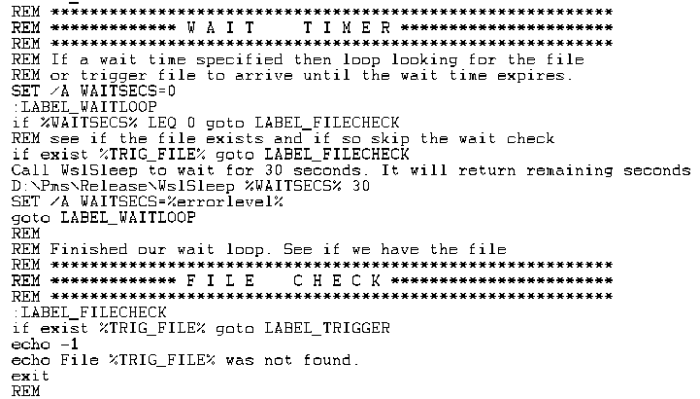
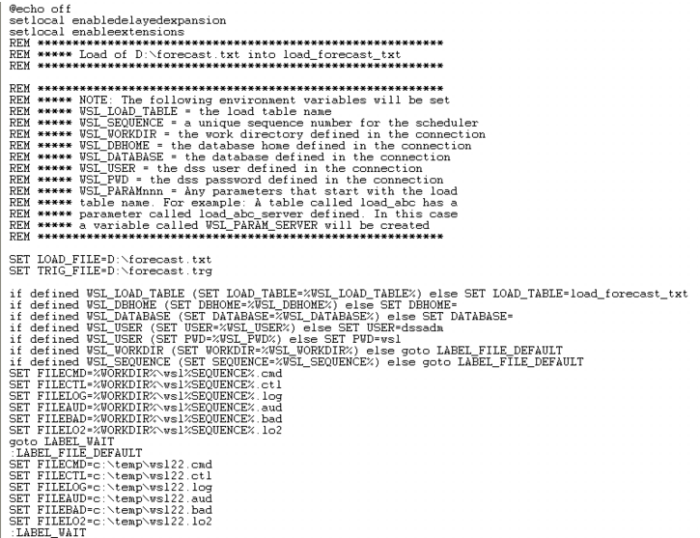
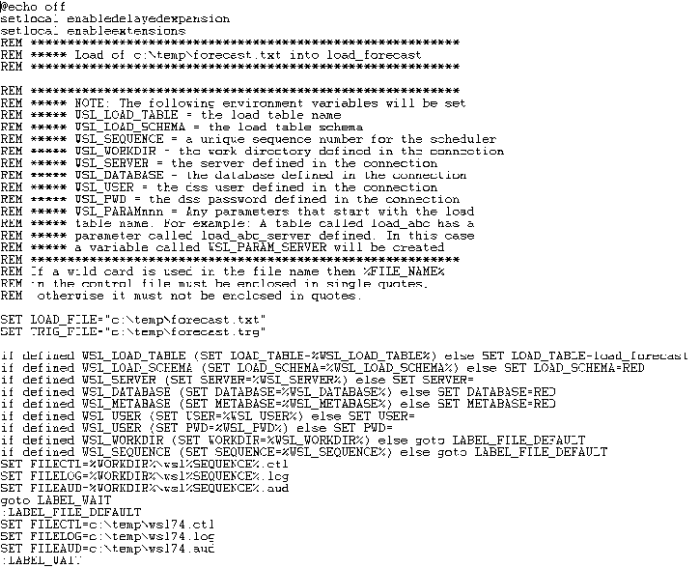
The script makes use of a number of environmental variables. These variable are acquired from both the table and connection properties. These variables are established in the environment by either QAD Data Warehouse Designer or the scheduler. If the script is to be executed outside of QAD Data Warehouse Designer or scheduler control then these variables will need to be assigned.
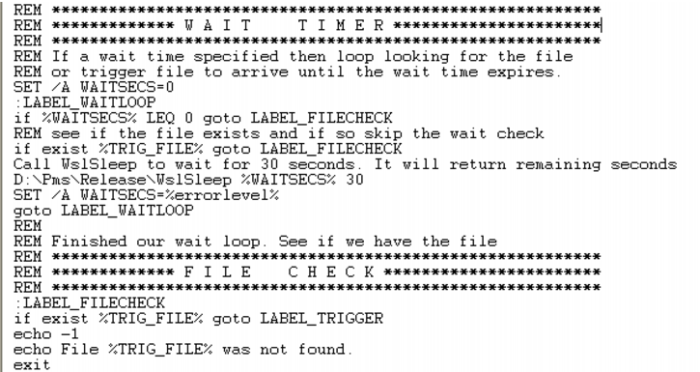
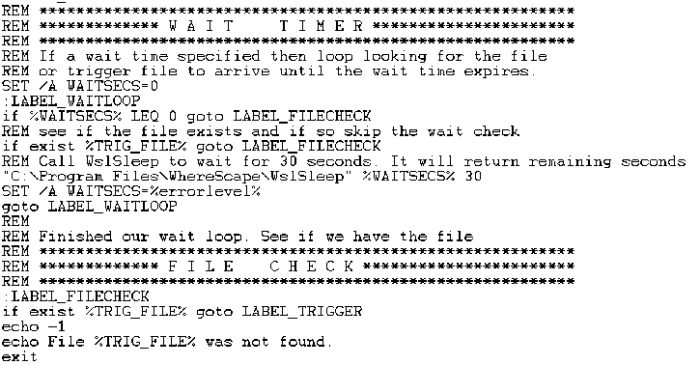
The first section of the script defines the variables. The second section provides a timed wait for the load file to arrive. By default the WAITSECS variable is set to zero, so that no wait occurs. This can be set to a number of seconds that the script is to wait for the file to arrive.
Once the wait has completed, either through a time expiry or through the location of the file, we check that the file is present, and if not found report back a warning. This warning can be changed to an error by changing the first echo statement to "-2". See the syntax section for more information.
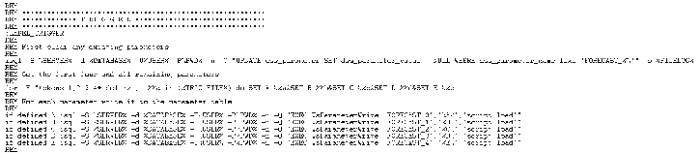
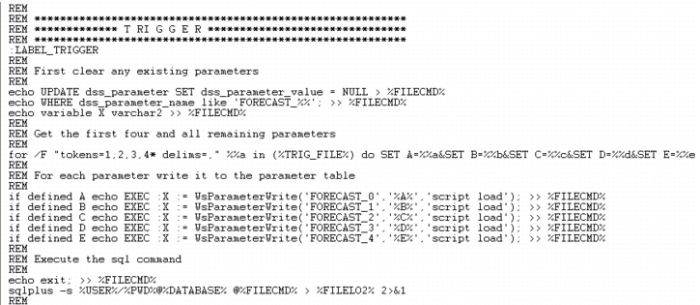
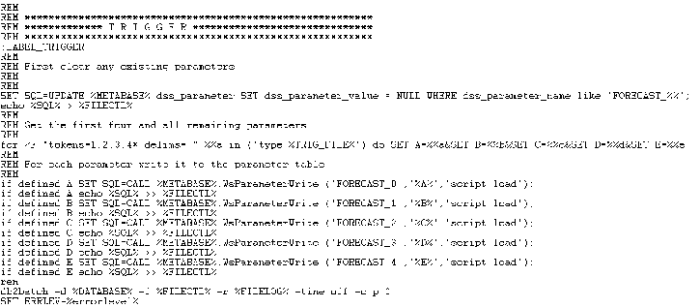
When a trigger file is specified the script looks for a trigger file, and will exit with the specified status if the file is not found. The following code is included if a trigger file is present.
Such a file (trigger) contains control information about the main file to be loaded and arrives after the main file to indicate that the main file transfer has completed and that it is OK to load.
This section loads the contents of the trigger file into the Parameters table, so that the table can be validated. See the section on Post Load procedures for an explanation on how trigger files are used to validate a load file.
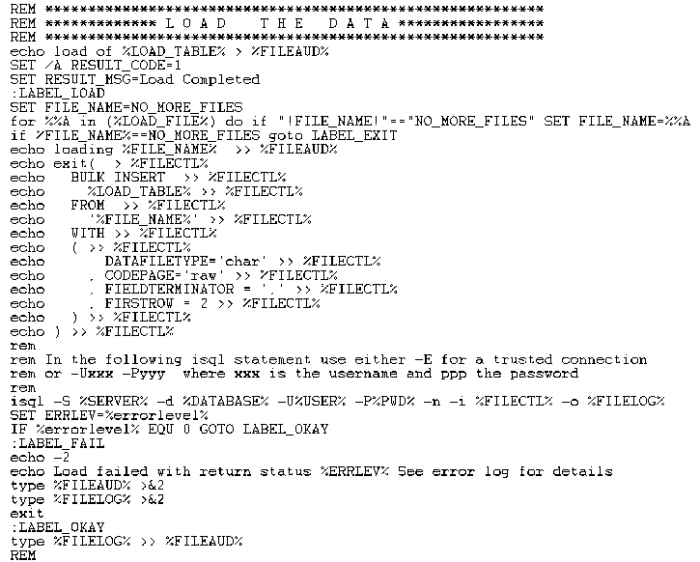
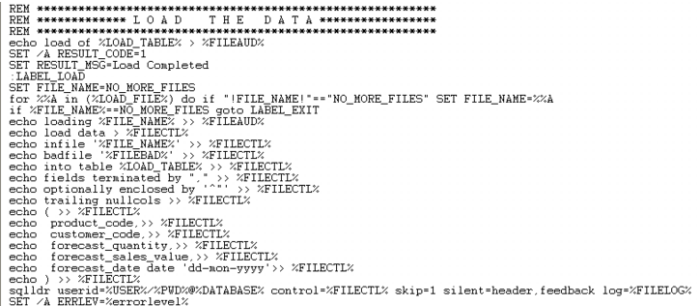
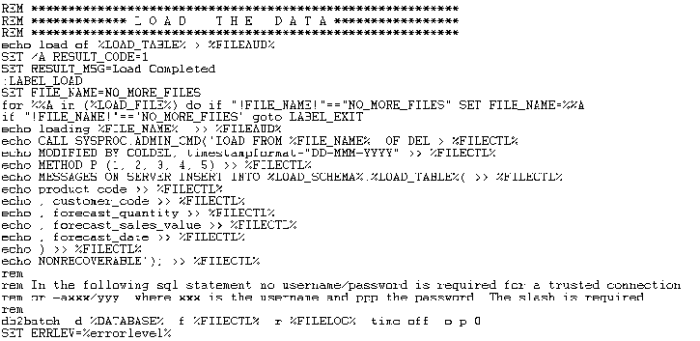
This section calls isql to invoke Bulk Insert to load the file. It makes use of a temporary file to build as a control file and then calls isql to load the data. Note that the load is actually in a for loop. Wild card file names can be used to load multiple files. Each file to be loaded must have the same format.
Note that the data being loaded is appended to the database table. As part of the scheduler run the load table is truncated if the property for truncation is set. In this way multiple files can be loaded into the database table.
 TIP
TIP: If this script is to be executed outside the control of the QAD Data Warehouse Designer scheduler then a truncate statement may need to be performed on the database load table. This would normally be placed before the 'for loop' and would look something like the following:
isql -S %SERVER% -d %DATABASE% -U%USER% -P%PWD% -n -Q "truncate table load_forecast" -o %FILELOG%
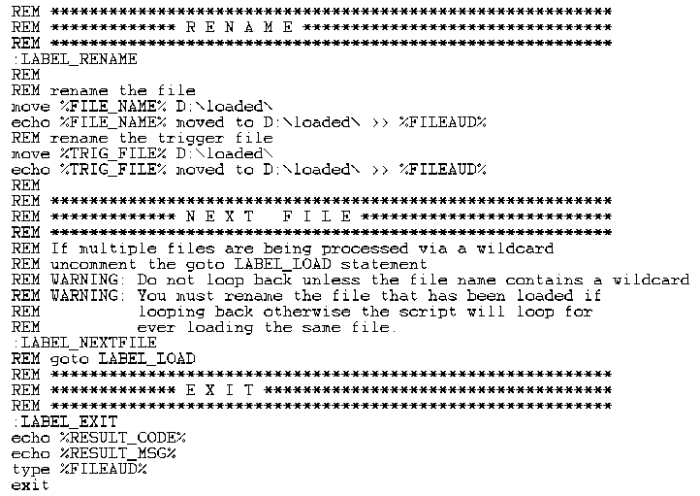
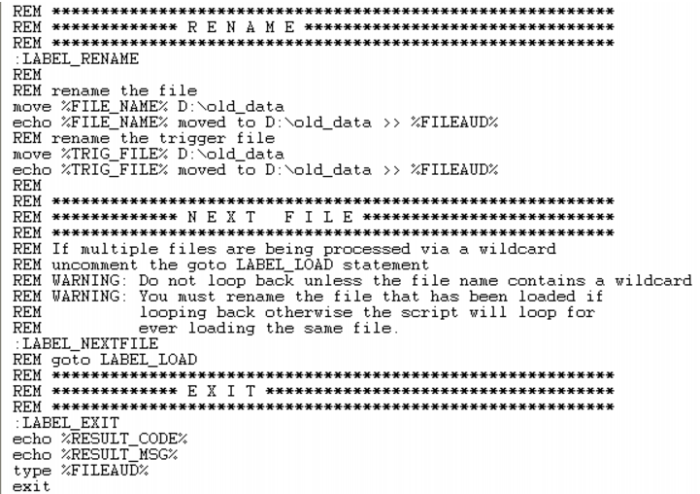
This next section handles the rename and potential looping. The first block of code renames the file and also the trigger file if appropriate. This code is only generated if the rename fields in the file attributes are populated.
The goto label_load statement 9 lines from the end can be used if all the files in a wild card file load are required. Simply uncomment this goto statement and the script will load each file in the wild card.
Script Generation (UNIX/Oracle)
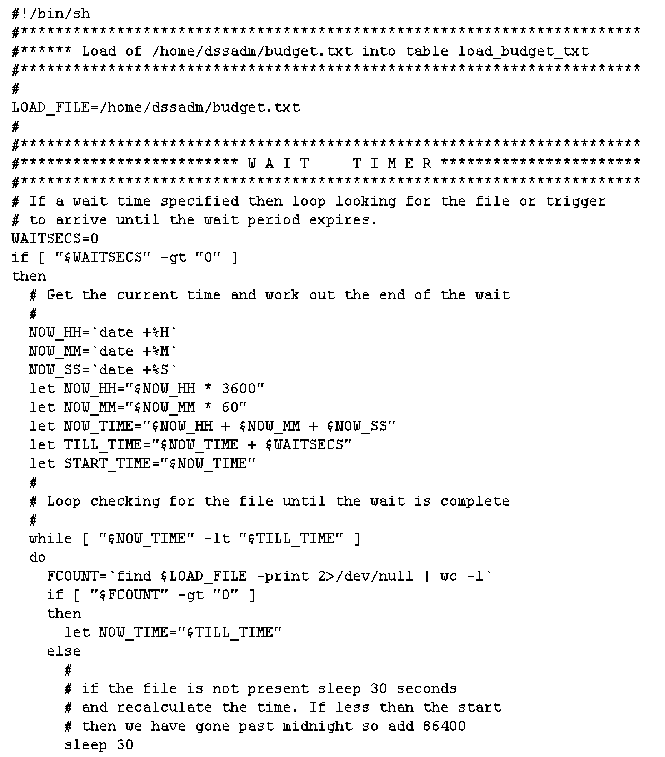
A sample UNIX script for Oracle is as follows. The key components of the script are described below:
The script makes use of two environmental variables called DSS_USER and DSS_PWD. These variables are established in the environment by the scheduler. If the script is to be executed outside of scheduler control then these two variables will need to be assigned after the LOAD_FILE variable.
The first section of the script defines the load_file variable. The second section provides a timed wait for the load file to arrive. By default the WAITSECS variable is set to zero, so that no wait occurs. This can be set to a number of seconds that the script is to wait for the file to arrive.
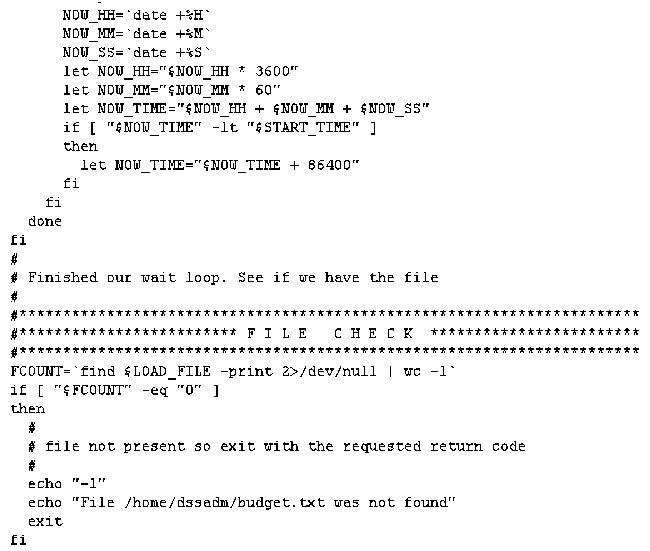
Once the wait has completed, either through a time expiry or through the location of the file, we check that the file is present, and if not found report back a warning. This warning can be changed to an error by changing the first echo statement to "-2". See the syntax section for more information.
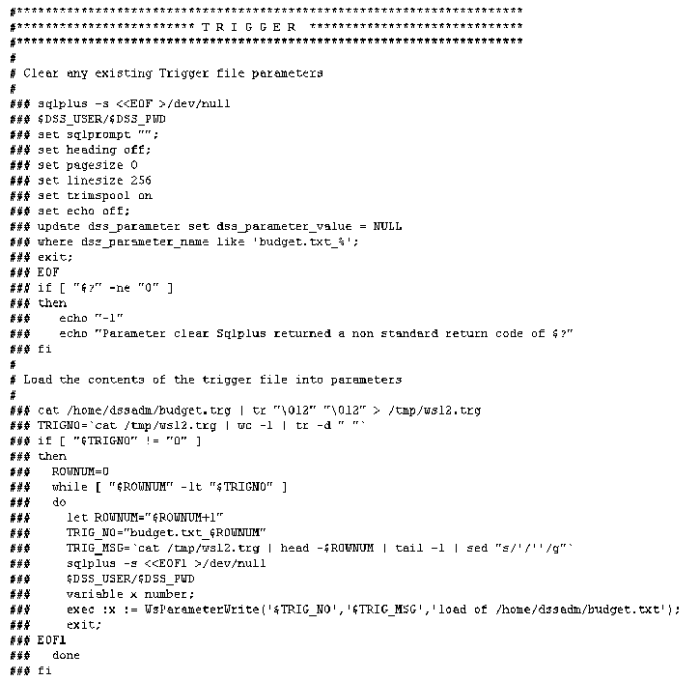
When the file based load is used instead of the script based load, the scheduler looks for a trigger file if defined, and will exit with the specified status if the file is not found.
This section of the script is commented out by default. It is used when a trigger file is present. Such a file contains control information about the main file to be loaded and arrives after the main file to indicate that the main file transfer has completed and that it is OK to load.
This section loads the contents of the trigger file into the Parameters table, so that the table can be validated. See the section on Post Load procedures for an explanation on how trigger files are used to validate a load file.
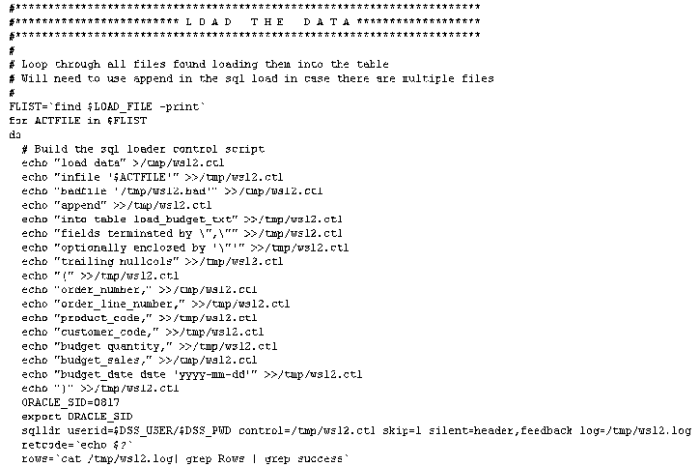
This section calls sql*loader to load the file. It makes use of a temporary file to build as a control file and then calls sqlldr to load the data. Note that the load is actually in a for loop. Wild card file names can be used to load multiple files. Each file to be loaded must have the same format.
Note that the data being loaded is appended to the database table. As part of the scheduler run the load table is truncated if the property for truncation is set. In this way multiple files can be loaded into the database table.
 TIP
TIP: If this script is to be executed outside the control of the QAD Data Warehouse Designer scheduler then a truncate statement may need to be performed on the database load table. This would normally be placed before the 'for loop' and would look something like the following:
echo "truncate table load_budget_txt;" >/tmp/wsl2.sql
echo "commit;" >>/tmp/wsl2.sql
echo "exit" >>/tmp/wsl2.sql
sqlplus $DSS_USER/$DSS_PWD @/tmp/wsl2.sql >/dev/null
Note that the first echo has a single output '>' whereas the subsequent lines have two '>>'. The first output command creates or re-creates the file and the subsequent lines append to it. We put the output of the command to the null device as we do not want data in the output stream that does not match our syntax.
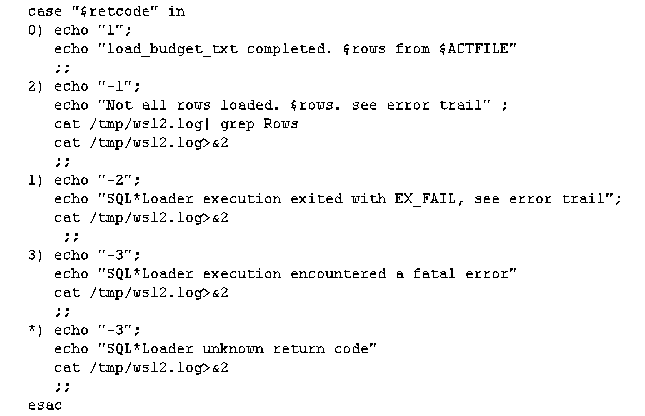
This section of the script checks the return code from the sql*loader command. Depending on the code it either identifies success, a warning or an error. In any non success situation it puts the log file out to the error stream '>&2'. This will result in the information ending up in the Detail/Error log when this script is executed through the scheduler.
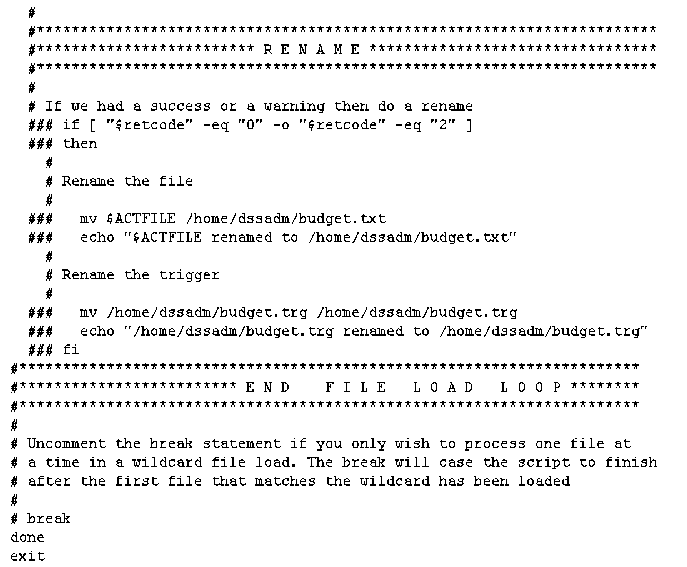
This final section is largely commented out. It ends with the closing of the for loop that processes each file in a wild card file load.
The first block of commented out code renames the file and also the trigger file if appropriate. If this action is required enter the rename path etc. and un-comment this code.
The break statement 3 lines from the end can be used if just the first file in a wild card file load is required. Simply uncomment this break statement and the script will end after the first file has been loaded.
Script Generation (Windows/Oracle)
A sample Windows script for Oracle is as follows. The key components of the script are described below:
The script makes use of a number of environmental variables. These variables are acquired from both the table and connection properties. These variables are established in the environment by either QAD Data Warehouse Designer or the scheduler. If the script is to be executed outside of QAD Data Warehouse Designer or scheduler control then these variables will need to be assigned.
The first section of the script defines the variables. The second section provides a timed wait for the load file to arrive. By default the WAITSECS variable is set to zero, so that no wait occurs. This can be set to a number of seconds that the script is to wait for the file to arrive.
Once the wait has completed, either through a time expiry or through the location of the file, we check that the file is present, and if not found report back a warning. This warning can be changed to an error by changing the first echo statement to "-2". See the syntax section for more information.
When a trigger file is specified the script looks for a trigger file, and will exit with the specified status if the file is not found. The following code is included if a trigger file is present.
Such a file (trigger) contains control information about the main file to be loaded and arrives after the main file to indicate that the main file transfer has completed and that it is OK to load.
This section loads the contents of the trigger file into the Parameters table, so that the table can be validated. See the section on Post Load procedures for an explanation on how trigger files are used to validate a load file.
This section calls sql*loader (bulk insert for SQL Server) to load the file. It makes use of a temporary file to build as a control file and then calls sqlldr to load the data. Note that the load is actually in a for loop. Wild card file names can be used to load multiple files. Each file to be loaded must have the same format.
Note that the data being loaded is appended to the database table. As part of the scheduler run the load table is truncated if the property for truncation is set. In this way multiple files can be loaded into the database table.
 TIP
TIP: If this script is to be executed outside the control of the QAD Data Warehouse Designer scheduler then a truncate statement may need to be performed on the database load table. This would normally be placed before the 'for loop' and for Oracle would look something like the following:
echo truncate table load_budget_txt; >/tmp/wsl2.sql
echo commit; >>/tmp/wsl2.sql
echo exit >>/tmp/wsl2.sql
sqlplus %USER%/%PWD%@%DATABASE% @/tmp/wsl2.sql > %FILELO2 2>&1
Note that the first echo has a single output '>' whereas the subsequent lines have two '>>'. The first output command creates or re-creates the file and the subsequent lines append to it. We put the output of the command to the null device as we do not want data in the output stream that does not match our syntax.
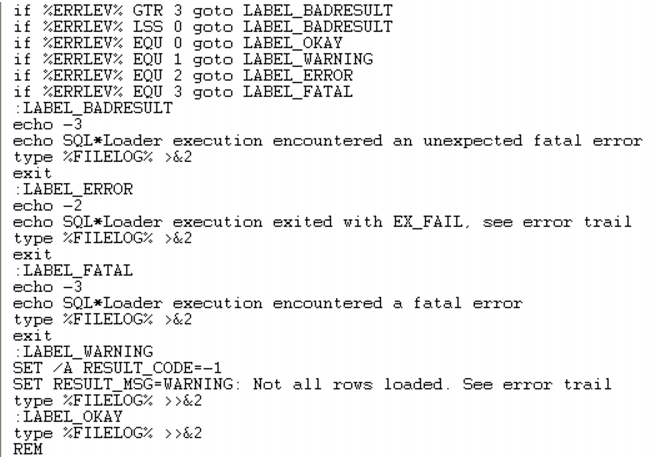
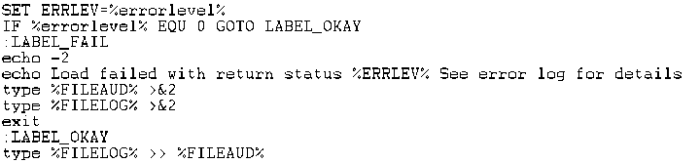
This next section handles the return status from the load. It returns the appropriate status and messages to the scheduler.
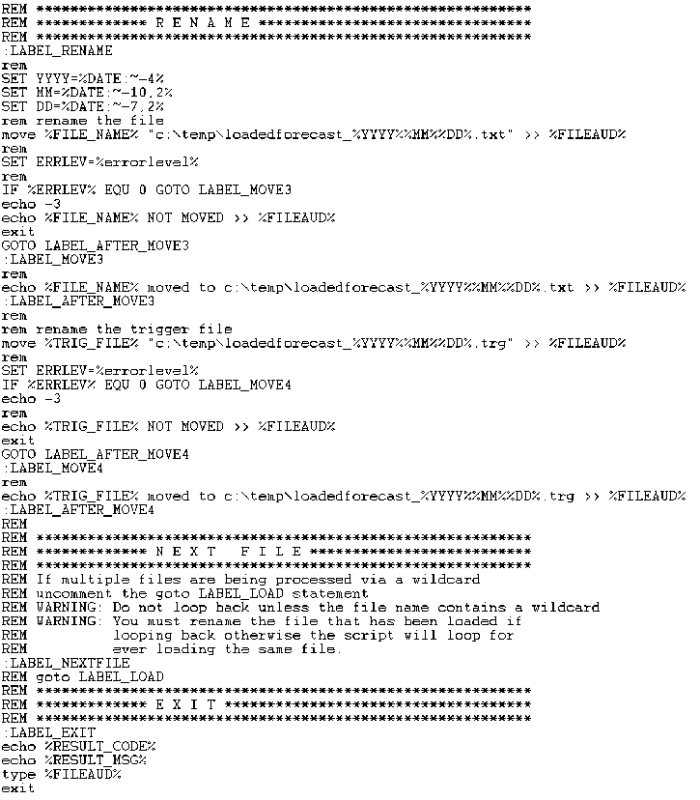
This final section is as follows:
The first block of code renames the file and also the trigger file if appropriate. This code is only generated if the rename fields in the file attributes are populated.
The goto label_load statement 9 lines from the end can be used if all the files in a wild card file load are required. Simply uncomment this goto statement and the script will load each file in the wild card.
Script Generation (Windows/DB2)
A sample Windows script for DB2 is as follows. The key components of the script are described below:
The script makes use of a number of environmental variables. These variables are acquired from both the table and connection properties. These variables are established in the environment by either QAD Data Warehouse Designer or the scheduler. If the script is to be executed outside of QAD Data Warehouse Designer or scheduler control then these variables will need to be assigned.
The first section of the script defines the variables. The second section provides a timed wait for the load file to arrive. By default the WAITSECS variable is set to zero, so that no wait occurs. This can be set to a number of seconds that the script is to wait for the file to arrive.
Once the wait has completed, either through a time expiry or through the location of the file, we check that the file is present, and if not found report back a warning. This warning can be changed to an error by changing the first echo statement to "-2". See the syntax section for more information.
When a trigger file is specified the script looks for a trigger file, and will exit with the specified status if the file is not found. The following code is included if a trigger file is present.
Such a file (trigger) contains control information about the main file to be loaded and arrives after the main file to indicate that the main file transfer has completed and that it is OK to load.
This section loads the contents of the trigger file into the Parameters table, so that the table can be validated. See the section on Post Load procedures for an explanation on how trigger files are used to validate a load file.
This section calls the DB2batch command to load the file. It makes use of a temporary file to build as a control file which includes a call to the LOAD statement. It then runs the temporary files using DB2batch to load the data. Note that the load is actually in a for loop. Wild card file names can be used to load multiple files. Each file to be loaded must have the same format.
Note that the data being loaded is appended to the database table. As part of the scheduler run the load table is truncated if the property for truncation is set. In this way multiple files can be loaded into the database table.
This next section handles the return status from the load. It returns the appropriate status and messages to the scheduler.
This final section is as follows:
The first block of code renames the file and also the trigger file if appropriate. This code is only generated if the rename fields in the file attributes are populated.
The goto label_load statement 9 lines from the end can be used if all the files in a wild card file load are required. Simply uncomment this goto statement and the script will load each file in the wild card.
Script Editing
QAD Data Warehouse Designer includes a script editor which allows the maintenance of any host scripts within the data warehouse. The editor is invoked by double clicking on a script name in the left pane or by selecting the 'Edit the script' pop-up menu option when a right mouse menu is activated on the script name.