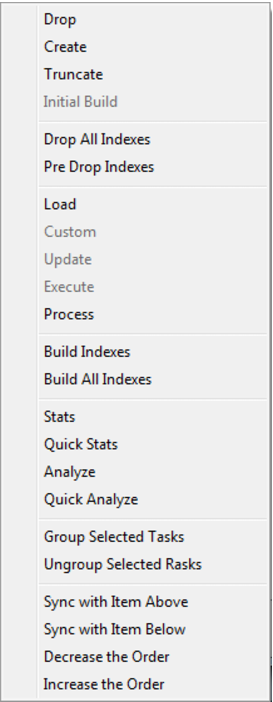
Action | Description |
Drop | Drop table, view or index. |
Create | Create table, view or index. |
Truncate | Delete all rows from the table. |
Initial Build | Drop All Indexes then Custom then Build All Indexes. |
Drop All Indexes | Drop all indexes on the table. |
Pre Drop Indexes | Drop all indexes on the table marked as "Pre Drop". |
Load | Load the table (Load tables only). |
Custom | Run the custom procedure on the table. |
Update | Run the update procedure on the table. |
Execute | Execute the procedure or host scripts. |
Process | Pre Drop Indexes then Update and then Build Indexes. |
Process and Statistics | Process then Default Stats as defined on Table Properties/ Statistics/Process and statistics method (DB2 only). |
Build Indexes | Build the indexes on the table marked as "Pre Drop". |
Build All Indexes | Build all indexes on the table. |
DB2: Analyze | Performs a custom analyze if defined in: Table Properties/Statistics/Analyze else for tables performs: RUNSTATS ON TABLE tabname WITH DISTRIBUTION AND DETAILED INDEXES ALL otherwise (for indexes): RUNSTATS ON TABLE indname FOR INDEXES |
DB2: Quick Analyze | Performs a custom analyze if defined in: Table Properties/Statistics/Quick Analyze else for tables performs: RUNSTATS ON TABLE tabname otherwise (for indexes): RUNSTATS ON TABLE indname FOR INDEXES |
DB2: Stats | Performs a custom stats if defined in: Table Properties/Statistics/Stats else for tables performs: RUNSTATS ON TABLE tabname WITH DISTRIBUTION AND DETAILED INDEXES ALL otherwise (for indexes): RUNSTATS ON TABLE indname FOR INDEXES |
DB2: Quick Stats | Performs a custom analyze if defined in: Table Properties/Statistics/Quick Stats else for tables performs: RUNSTATS ON TABLE tabname otherwise (for indexes): RUNSTATS ON TABLE indname FOR INDEXES |
Oracle: Analyze | Performs a custom analyze if defined in: Tools-Options-Statistics-Table/Index Analyze Full otherwise performs: ANALYZE TABLE / INDEX name COMPUTE STATISTICS |
Oracle: Quick Analyze | Performs a custom analyze if defined in: Tools-Options-Statistics-Table/Index Analyze Quick otherwise performs: ANALYZE TABLE / INDEX name ESTIMATE STATISTICS SAMPLE 3 PERCENT |
Oracle: Stats | Performs a custom stats if defined in: Tools-Options-Statistics-Table/Index Stats Full otherwise performs: DBMS_STATS.GATHER_ TABLE / INDEX _STATS() using the ownname and tabname / indname parameters with cascade. |
Oracle: Quick Stats | Performs a custom analyze if defined in: Tools-Options-Statistics-Table/Index Stats Quick otherwise performs: DBMS_STATS.GATHER_ TABLE / INDEX _STATS() using the ownname and tabname/indname parameters with cascade and estimate_percent = 3. |
SQL Server: Analyze | Performs: UPDATE STATISTICS name WITH FULLSCAN |
SQL Server: Quick Analyze | Performs: UPDATE STATISTICS name WITH SAMPLE 3 PERCENT |
SQL Server: Stats | Same as Analyze. |
SQL Server: Quick Stats | Same as Quick Analyze. |
Task Option | Description |
Group selected tasks | Groups two or more selected tasks to have the same order value, allowing them to run in parallel if the maximum threads setting allows. |
Un-group selected tasks | Un-group selected tasks. |
Sync with item above | Changes a selected task to have the same order value as the task above it, allowing them to run in parallel if the maximum threads setting allows. |
Sync with item below | Changes a selected task to have the same order value as the task below it, allowing them to run in parallel if the maximum threads setting allows. |
Decrease the order | Changes a selected task to an order number one less than its current value. The task will now run immediately before it would have previously. |
Increase the order | Changes a selected task to an order number one more than its current value. The task will now run immediately after it would have previously. |