Editing a Job's Dependencies from a Job Dependencies diagram
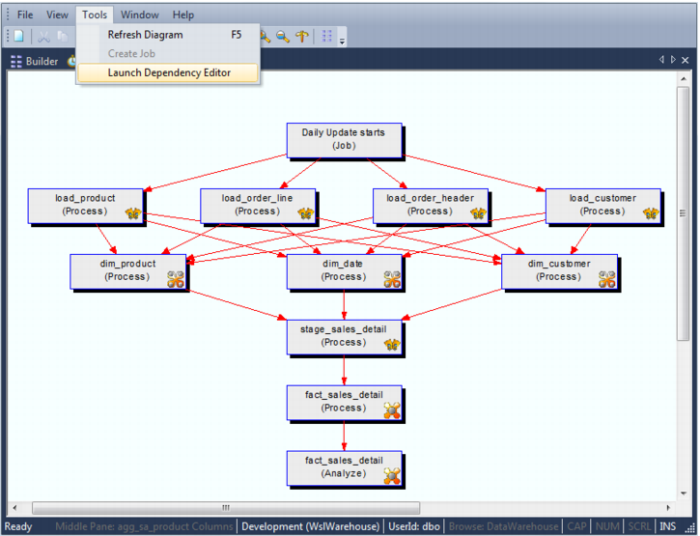
Once a Job Dependencies diagram has been created for a job, its dependencies can be edited from the diagram. To do this, choose Launch Dependency Editor from the Tools menu:
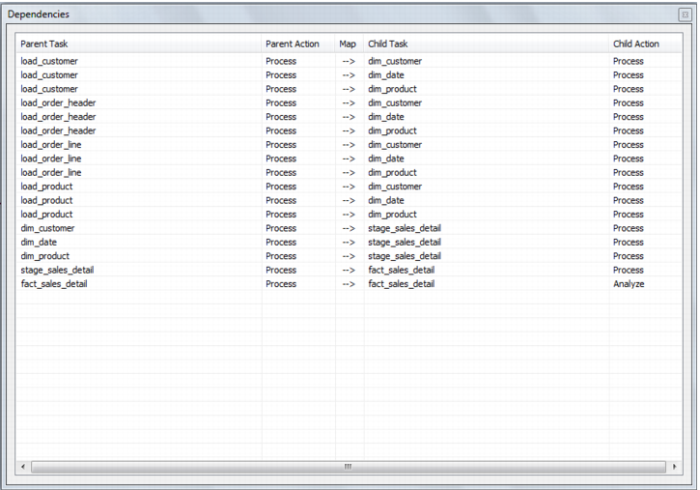
This displays the following dialog:
Query Tool Access
Where the business definition has been set in the properties of either a fact or dimension column QAD Data Warehouse Designer will attempt to record this information in the database. For the Oracle database this business definition is stored as a column comment. Many end user query tools can make use of these Oracle column comments. They can also be examined via the Oracle database system views all_col_comments and user_col_comments. For the SQL Server database the business definition is also stored as a column comment via the sp_addextendedproperty procedure with a property name of 'Comment'.
In addition a number of metadata views exist to make the task of connecting an end user query tool to the data warehouse simpler. Many end user tools can make use of external data to populate their end-user-layer (eul) definitions. Using these views end user query tools can utilize QAD Data Warehouse Designer's business metadata. The views supplied are: