Altering Metadata
This chapter provides information on how to change and manipulate the data warehouse once it has been established.
New source columns or changes to the source systems from which the data warehouse is built will require modifications to both the metadata and the data warehouse tables and procedures.
Validating Tables
The metadata as stored and maintained by QAD Data Warehouse Designer does not necessarily reflect the actual tables and procedures in use in the data warehouse. For example if a new column is added to the metadata for a table then that change is not automatically made in the actual physical table residing in the data warehouse. Likewise if a column is deleted from the metadata then that column may still exist in the physical database table.
This situation may be particularly apparent after an application patch or upgrade. The menu option Validate/Validate Table Create Status , and the right mouse menu options in either the left hand or middle panes all provide a means of comparing the metadata to the physical tables in the database. A table, range of tables or all tables can be chosen. Each chosen table is a table in the metadata and it is compared against the physical database table if it exists.
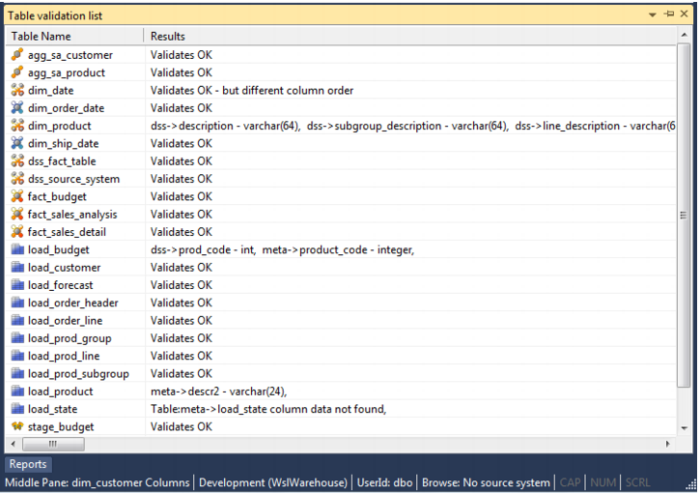
The following example is the output from a validation.
In this example we see five different scenarios.
The metadata for table agg_sa_customer matches the physical table in the database.
The table dim_date has the same columns in both the metadata and the physical table, but the column order is different. This is probably not an issue for most tables, but may be a problem for some type of load tables, where the column order is important. This could be the result of a previous altering of the table. The table must be re-created if the order is important.
The physical database table dim_product has an additional columns not found in the metadata. The columns are 'description' and 'subgroup_description'. The table can be altered if desired. See the next section on Altering Tables.
The metadata for the table load_product does not match the physical table. The metadata has an additional column called 'State'. This column was not found in the physical table. The table can be altered if desired. See the next section on Altering Tables.
The table load_state is defined in the metadata but has not been physically created in the database. The table can be created in the normal manner.