How QAD keeps marketing campaigns on track
Marketing Campaigns
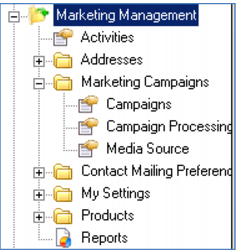
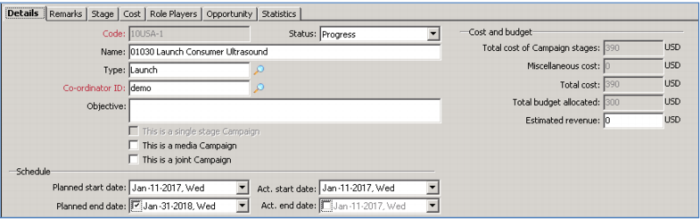
Here you see open Campaigns - when they start and end, the objective, status, budget, stages, participants, opportunity and statistics. You can choose appropriate campaign media and execute campaigns according to planned schedules.
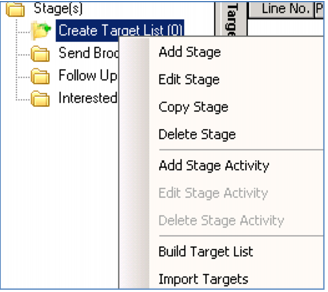
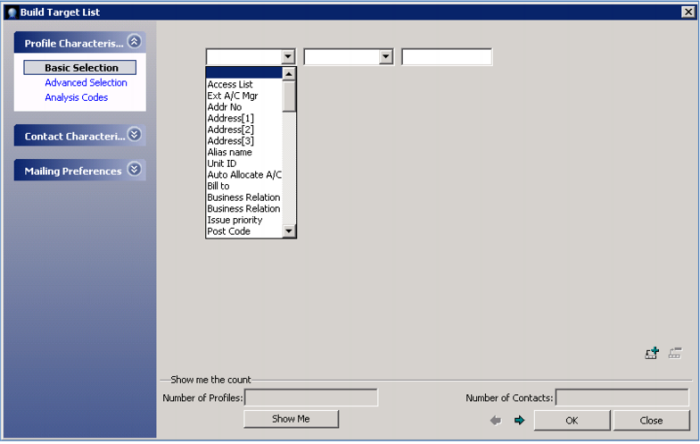
Each campaign consists of one or more stages and activities. You calculate and assign costs by stage. You can also maintain target audience information – for example choosing targets from a specific Industry or Region. You could also choose targets by company size, time zone, region, or a combination of criteria; and you can import targets from an external source – perhaps from a purchased list.
Some companies will also use campaigns for customer service - setting up a telemarketing campaign to reach out to all new customers – perhaps those who have purchased in the last 6 months. You might even track hospitality or events as a campaign… your annual golf outing or user group meeting!
Using CRM, you can closely manage all campaigns, ensuring all of them stay on time and within budget.
Demo
Note selections for Industry, Region
Key Points
• Campaign Start / End, Status, Objective, Budget, Participants, Statistics
• Campaign Media
• Planned Schedules
• Multiple Stages & Activities
• Targets per Stage
o Choose from list; multiple criteria
o Import list
• Sales and Customer Service Campaigns