Programs
The modules within the QAD CRM system are collections of Progress programs. Programs have user interfaces such as dialog boxes or screens.
Each system program has objects or procedures, which are used to perform various tasks. For example, the Activity Manager has the Add Activity procedure that the program uses to add details of a new activity.
Programs have two levels of objects:
• Tab-level
• Procedure-level
Tab-Level Objects
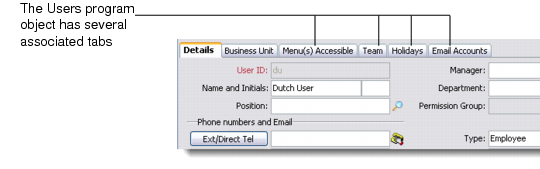
You can maintain the tabs on program screens, their labels, display order, and context ID used for the help system. For example, you can configure the Details tab in the Activity Manager program to be the second tab from the left-hand side of the program object.
Program Object and Tabs
Tabs typically contain procedures. For example, the Holidays tab generally has options to execute the Add, Edit, and Delete procedures. In this case, these three procedure objects are associated with the Holidays tab object.
Procedure-Level Objects
Procedure-level objects are associated with tab objects and define the tab contents. Procedure-level objects specify internal procedures for performing tasks. For example, the ability to add details of a new activity in the Activity Manager program is achieved through a procedure-level object.
You can put procedure-level objects in the toolbar and/or menu. Some procedures have a user interface—others can run in the background without being noticed by the user.
When configuring security, you can specify which users can access a tab or procedure. Implementing new or modified objects requires technical knowledge of the QAD CRM system; it is recommended that you contact QAD Services prior to customizing your system.
For details on using the Program Manager, see
Program Manager.