Design or Edit Templates
To design a template, do the following:
1 Select a template record from the list of registered templates in the Standard Letters browser.
2 With a selected template record, do one of the following:
• Click the Design Template button on the toolbar.
• Right-click anywhere in the list of templates and choose Design Template.
• Select Design Template from the File menu on the menu bar.
3 Design a new template according to your requirements, or edit an existing template.
4 Save and close the template.
New Template
If there is no template associated with a template entry, the system opens Microsoft Word and creates a blank template. The name and location where the system saves the blank template is specified in the template entry.
Design New Template
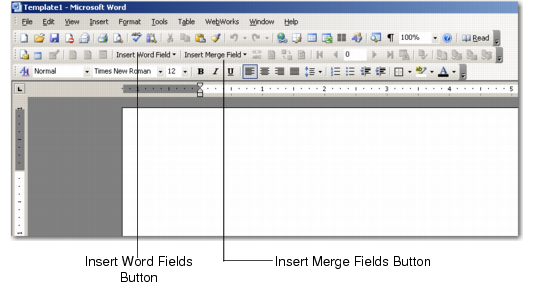
Though you can design a new template directly from Microsoft Word, it is recommended that you do this from within the QAD CRM system. When you design a template through the system, the template includes the Insert Merge Fields button to insert custom results of associated queries, which are otherwise not available. The query fields available depend on the query you specify while adding the template entry.
When you design a template, by default, Microsoft Word 2003 does not display the Insert Merge Field button on the toolbar. Perform the following steps to enable the Insert Merge Field button, once you have selected the Design or Edit template option from CRM:
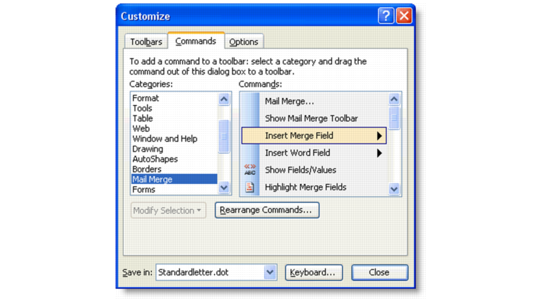
1 On the toolbar, right-click and select Customize.
2 Select Mail Merge from the categories and then Insert Merge Field from the right-hand side commands.
Insert Merge Field
3 Drag the Insert Merge Field command and drop just after Insert Word Field.
Existing Template
If an existing template is already associated with a template entry, the system prompts you to confirm. If you choose to redesign the template, the system deletes all content in the template and opens it for editing.
System Message-Existing Template
Note: Opening an existing template in redesign mode removes the previous content. QAD recommends that you open an existing template in edit mode instead.