Product
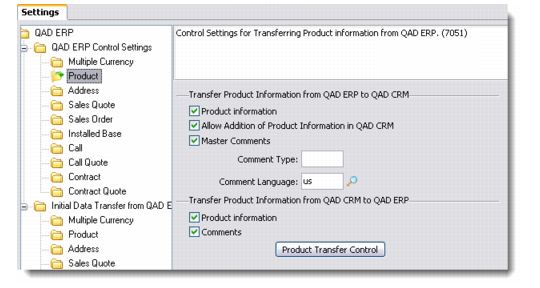
Use this option to define control settings for transferring product information to and from QAD Enterprise Applications.
Product
From QAD Enterprise Applications to QAD CRM
Product Information
Select this check box to enable the transfer of product information from QAD Enterprise Applications.
Allow Addition of Product Information in QAD CRM
Select this check box to enable QAD CRM to add the product information received from QAD Enterprise Applications into its database.
Master Comments
Select this check box to transfer master comments from QAD Enterprise Applications. This option is enabled only when you select the Product Info check box.
Comment Type
Enter a comment type for the transaction.
Comment Language
Choose a comment language from the lookup.
From QAD CRM to QAD Enterprise Applications
Product Information
Select this check box to enable transfer of product information from QAD CRM to QAD Enterprise Applications.
Comments
Select this check box to transfer comments from QAD CRM.
After completing the above settings, click the Product Transfer Control button. The Product Transfer Settings window displays. QAD CRM does not download all the Items from QAD Enterprise Applications. It downloads based on the parameters specified in the Product transfer control settings.
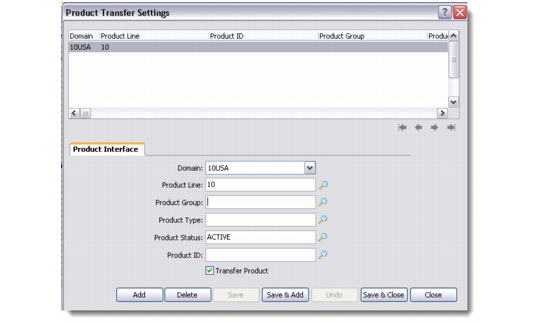
Product Transfer Settings
The Product Transfer Settings window lets you provide details for each product that you want to include in the integration process. It also lets you maintain details for all existing product lines that participate in the integration.
Product Interface
Control Type
Enter the control type for the product selected.
Note: This field is currently hard coded to Product and the system does not let you enter any data in this field.
Product Line
Use the lookup to enter the product line.
Product Group
Use the lookup to enter the product group.
Product Type
Use the lookup to enter the product type.
Product Status
Use the lookup to enter the product status.
Note: This field is used in all the product transfer control conditions described below.
Product ID
Use the lookup to enter the product ID.
Transfer Product
Select this check box to include the products selected in the fields above.
The Product Transfer Settings window checks for product transfer control conditions in the following order:
1 Product ID with Product Status
2 Product Line, Product Group and Product Status
3 Product Line, Product Type and Product Status
4 Product Line and Product Status
The Product Status field is used by the system in all conditions.