Profile Selection
You can manually select the profiles to reassign, or use search criteria to assemble a list of profiles to be reassigned. If you need to reassign many profiles, use search criteria to save time.
Manual Selection
To select a profile manually:
1 Choose Main Menu|Settings|Territory Management|Reassign Territories. The List browser displays any profiles in the system requiring reassignment that have not yet been processed.
Note: If you already see the profiles you want to reassign, select the profiles and jump to
Profile Processing.
2 Right-click the browser and choose Add. The Enter Profile dialog box displays.
Note: You can remove a profile from the reassignment list by right-clicking the profile and choosing Delete. This removes the profile from the reassignment list—it does not delete the profile from the system.
3 Click the Select Profile button. The Find Profile/Contact dialog box displays.
4 Locate and select the profile you want to reassign, and then click OK.
5 Click OK to add the selected profile to the list for reassignment.
Selecting Profiles Search Criteria
1 Choose Main Menu|Settings|Territory Management|Reassign Territories.
2 Right-click the List browser and choose Build.
Note: You can also choose File|Build or click Build on the toolbar.
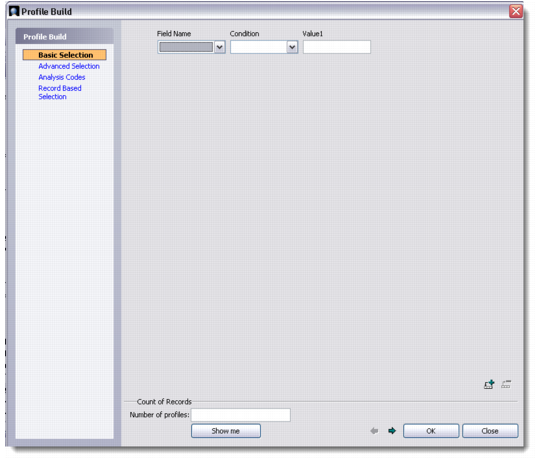
The Profile Build dialog box displays.
Profile Build - Advanced Selection
3 Specify your criteria for selecting profiles in the fields at the top of the dialog box.
Note: You can click Basic Selection, Advanced Selection, Analysis Codes, or Record Based Selection to change the types of criteria you can use.
For example, to display all profiles in the North region, specify the following:
(PROSPECT.Region is(exactly) 'North')
To add more criteria, click Append and repeat this step.
Note: Syntax errors may occur when you append or modify conditions. It is a good practice to check the syntax before processing conditions. To check syntax errors, click Check Syntax.
4 Click OK. The profiles that fulfill the specified conditions are displayed in the List browser. You can now reassign these profiles to a different account manager; see
Profile Processing.