Customer Relationship Management 6.7
>
Administration Guide
>
System Configuration
>
AppServer Service Maintenance
AppServer Service Maintenance
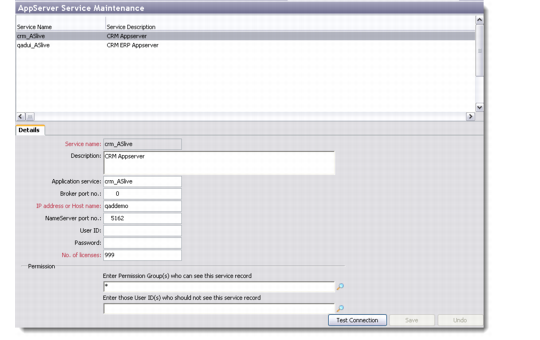
The AppServer Service Maintenance browser displays the list of application services available in the system. You can add, edit, copy, and delete application services.
To enable the AdminService utility to run on your system, you must first configure your application server (AppServer) settings in the QAD CRM system.
AppServer Service Maintenance
Details
Use the Details tab to record basic information about a new service.
Service name
Enter the name of the new service you are adding.
Description
Enter a description for the new service.
Application service
Enter a name of a valid AppServer Application Service.
Broker port no.
Enter the port number of the broker.
IP Address or Host name
Enter the host name or IP address of the NameServer that provides the AppServer connection.
NameServer port no.
Enter the port number of the NameServer that provides the AppServer connection.
User ID
Enter the unique code to connect to the AppServer. This is not a mandatory field.
Password
Enter a password that will enable connecting to the AppServer. This is not a mandatory field.
No. of licenses
Enter the number of licenses that will be issued for using the new service. If you do not know the number of licenses, enter 99.
Permission
Use the look-up buttons to define permissions to the new service. You can grant access or deny permissions to specified user groups.
Click the Test Connection button to check whether the new service that you have set up works effectively. If it does, you can save the service record.