Autonumber Sequences
When QAD CRM creates customers/debtors in QAD Enterprise Applications, it uses autonumber sequences to allocate the next customer number. Autonumber sequences are enabled by default in QAD Enterprise Applications – Standard Edition. Enable the following autonumber sequences in QAD Enterprise Applications – Enterprise Edition:
• Business relations
• Customer and customer ship-tos
The scope of each sequence is different. Business relation autonumbers are database wide, but customer autonumbers are at the shared set level.
Log in to QAD Enterprise Applications – Enterprise Edition.
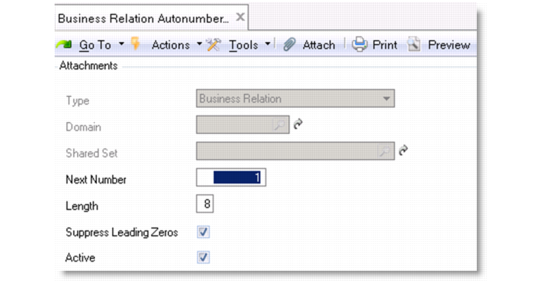
Select Business Relation Autonumber Activate option from the menu.
Business Relation Autonumber
Type
This field cannot be updated. It automatically displays the type of component that this autonumbering sequence applies to.
Next Number
Specify the next number in the sequence. The system will assign this number to the next record created, and will automatically increment the number for each subsequent record. The number you define must be greater than the number previously defined in the Next Number field.
If you enter a number that has already been assigned to a record, the system displays an error message.
Length
Specify the maximum allowed length for the generated number. The system uses this value to determine the number of leading zeros to add, when required, and to validate automatically generated numbers to ensure they do not become too long.
Suppress Leading Zeros
Select the field to prevent the system from adding leading zeros to generated numbers that are less than the maximum length.
Active
Select the field to enable autonumbering for the business relation.
To enable autonumber sequence for customers:
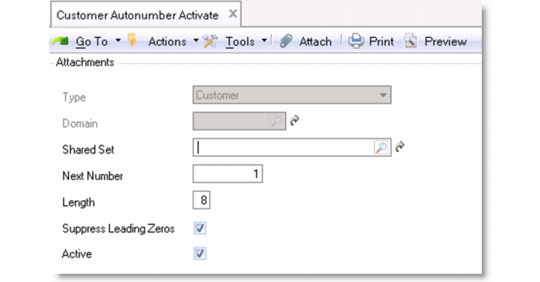
Select Customer Autonumber Activate (27.20.24.1) from the menu.
Customer Autonumber Activate
Type
This field cannot be updated. It automatically displays the type of component that this autonumbering sequence applies to.
Shared Set
Specify the shared set that this numbering sequence applies to.
Next Number
Specify the next number in the sequence. The system will assign this number to the next record created, and will automatically increment the number for each subsequent record. The number you define must be greater than the number previously defined in the Next Number field.
If you enter a number that has already been assigned to a record, the system displays an error message.
Length
Specify the maximum allowed length for the generated number. The system uses this value to determine the number of leading zeros to add, when required, and to validate automatically generated numbers to ensure they do not become too long.
Suppress Leading Zeros
Select the field to prevent the system from adding leading zeros to generated numbers that are less than the maximum length.
Active
Select the field to enable autonumbering for the business relation.
Repeat the above steps for all the shared sets you want to participate in the integration.