QAD Customer Relationship Management 6.7.2
>
Administration Guide
>
System Configuration
>
System Messages
System Messages
You can use the System Messages option to create new messages or edit existing ones.
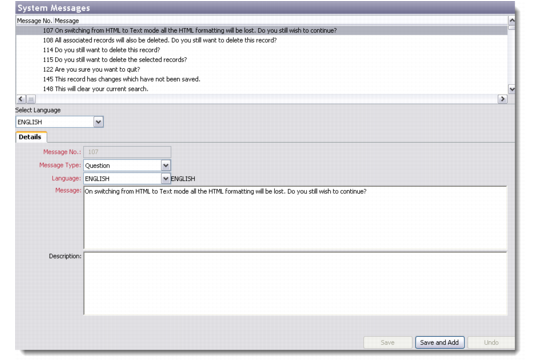
The System Messages browser displays the list of messages available in the database. You can add, edit, copy, and delete messages through this screen.
System Messages
Details
Use the Details tab to record the complete description of a new message.
Select Language
Choose the display language for the new message using this dropdown. If you select the asterisk (*), the new message will display in all the languages supported by the system.
Message Number
Enter the message number of the new message you are creating.
Message Type
Select a message type from the drop-down list. The five options available are Information, Question, Error, Warning, and Informative Text.
Language
Select the language in which you want to create the new message.
Note: The system gives you the option of displaying the same message in multiple languages. In such a case, the message number remains the same but multiple versions of the same message are saved in different languages. The end user sees the message display in the language specified during login.
Message
Enter the actual message content the system will display.
Description
Enter any additional description for the message.