Configurations
After you finish copying the databases to the live database, configure the following settings to complete the CRM LIVE to CRM TEST database refresh process:
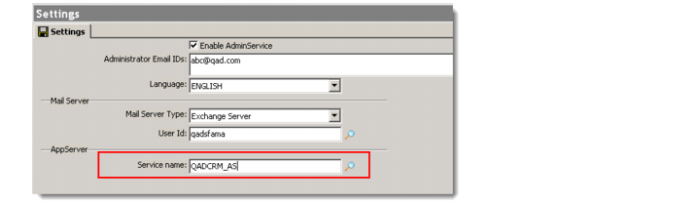
• AdminService Settings
Change the AppServer service name in the AdminService Settings.
Launch a Progress Editor session connected to the TEST databases, and run the following simple Progress 4GL update routine:
## Code Start
define buffer alt_bisgparam for bisg_param.
find first bisg_param where bisg_param.auth = "THISNODE" and
bisg_param.rec_num = 1 NO-LOCK no-error.
find first alt_bisgparam where alt_bisgparam.auth = bisg_param.ch_80[1] and
alt_bisgparam.rec_num = 700 no-error.
assign alt_bisgparam.ch_80[7] = <Service name for example "qadsfamatest">
## Code end
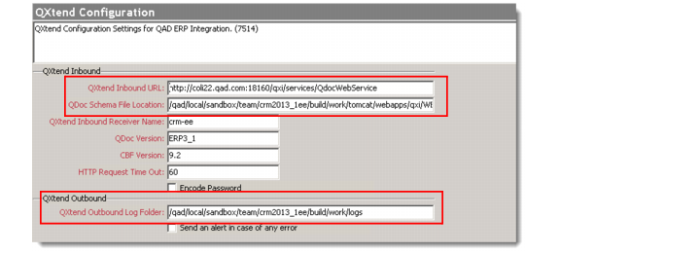
• QXtend Configuration
This configuration is required for integration of QAD Enterprise Applications (Enterprise Application).
Launch a Progress Editor session connected to the TEST databases, and run the following Progress 4GL update routine:
## Code begins
find first bisg_param where bisg_param.auth = "THISNODE" and
bisg_param.rec_num = 512 exclusive-lock no-error.
bisg_param.ch_80[1] = <QXtend Inbound URL>
bisg_param.ch_80[2] = <QDoc Schema File Location>
bisg_param.ch_80[10] = <QXtend Outbound Log Folder>
##Code end>
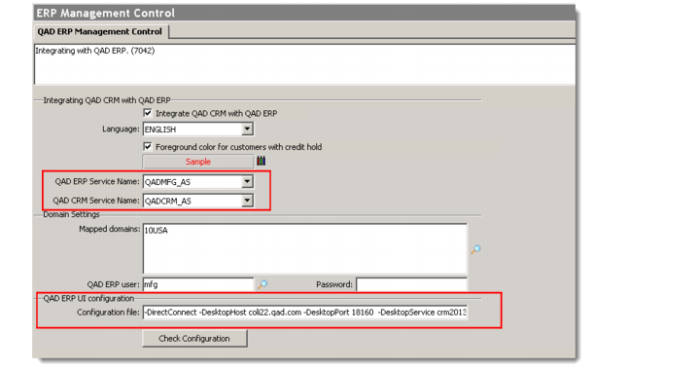
• ERP Management Control
Modify QAD ERP Service Name, QAD CRM Service Name, and QAD ERP UI configuration.
Launch a Progress Editor session connected to the TEST databases, and run the following Progress 4GL update routine:
##Code begins
find first bisg_param where bisg_param.auth = "THISNODE" and
bisg_param.rec_num = 500 exclusive-lock no-error.
ch_80[6] = QAD ERP Service Name
ch_80[1] = QAD CRM Service Name
ch_1[5] = QAD ERP UI Configuration
##Code end
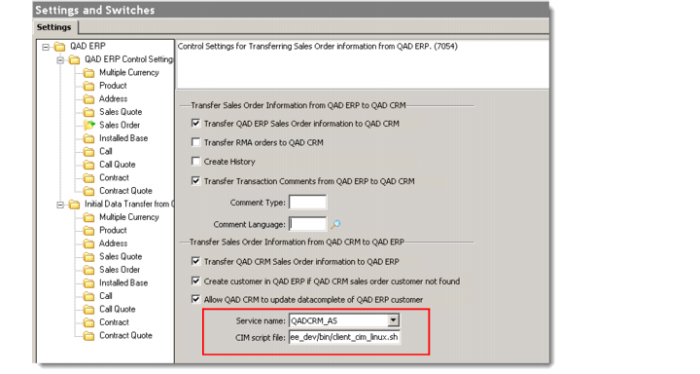
• Sales Order Integration
Modify Service name and CIM script file location.
Launch a Progress Editor session connected to the TEST databases, and run the following Progress 4GL update routine:
##Code begins
find first bisg_param where bisg_param.auth = "THISNODE" and
bisg_param.rec_num = 507 no-error.
bisg_param.ch_80[1] = QAD CRM Service Name
bisg_param.ch_80[2] = CIM Script file
##Code end
• Code Example - The following is an example program that combines all the previously described database updates required into a single program. You can substitute the appropriate values and refresh your Test CRM databases with a single update routine.
<Program Start>
/* ******************************************************************
Description - QAD CRM database refresh procedure
Note - Modify below initial values as per the environment.
******************************************************************* */
/* Variable section */
define variable w_crmnode as character init "THISNODE" no-undo.
define variable w_crmasname as character init "crm_AS" no-undo. /*CRM Appserver Service name */
define variable w_erpasname as character init "erp_AS" no-undo. /* ERP Appserver Service name */
define variable w_erpuiconf as character init "-DirectConnect -DesktopHost coli22.qad.com -DesktopPort 54080 -DesktopService qadui -Configuration dev -WebApp qadhome" no-undo. /* QAD ERP UI configuration */
define variable w_qxiurl as character init "http://coli22.qad.com:7054/qxi_dev/QdocWebService" no-undo. /* QXtend Inbound URL */
define variable w_qdoclocation as character init "/qad/dev/tomcatqxt/6.0.24/webapps/qxi_dev/WEB-INF/QADEE" no-undo. /* QDoc Schema file location */
define variable w_qxologdir as character init "/qadtmp/dev/logs" no-undo. /* Qxtend outbound log folder */
define variable w_cimscriptfile as character init "/qad/dev/qdt/envs/dev/scripts/client_cim_linux.sh" no-undo. /* CIM Script file */
define buffer alt_bisgparam for bisg_param.
disable triggers for load of bisg_param.
find first alt_bisgparam where alt_bisgparam.auth = w_crmnode and
alt_bisgparam.rec_num = 1 NO-LOCK no-error.
/* Adminservice settings */
find first bisg_param where bisg_param.auth = alt_bisgparam.ch_80[1]
and bisg_param.rec_num = 700
exclusive-lock no-error.
if available bisg_param then
bisg_param.ch_80[7] = w_crmasname.
/* Qxtend configuration */
find first bisg_param where bisg_param.auth = w_crmnode
and bisg_param.rec_num = 512
exclusive-lock no-error.
if available bisg_param then
assign bisg_param.ch_80[1] = w_qxiurl
bisg_param.ch_80[2] = w_qdoclocation
bisg_param.ch_80[10] = w_qxologdir.
/* ERP management control */
find first bisg_param where bisg_param.auth = w_crmnode
and bisg_param.rec_num = 500
exclusive-lock no-error.
if available bisg_param then
assign bisg_param.ch_80[6] = w_erpasname
bisg_param.ch_80[1] = w_crmasname
bisg_param.ch_1[5] = w_erpuiconf.
/* SO Integration */
find first bisg_param where bisg_param.auth = w_crmnode
and bisg_param.rec_num = 507
exclusive-lock no-error.
if available bisg_param then
assign bisg_param.ch_80[1] = w_crmasname
bisg_param.ch_80[2] = w_cimscriptfile.
<Program end >