QAD Customer Relationship Management 6.7.3
>
Administration Guide
>
System Configuration
>
Schedule Maintenance
Schedule Maintenance
You can use the Schedule Maintenance option to maintain all schedules defined in the system. Schedules can be attached to defined jobs created for AdminService, or used for replication in Activities.
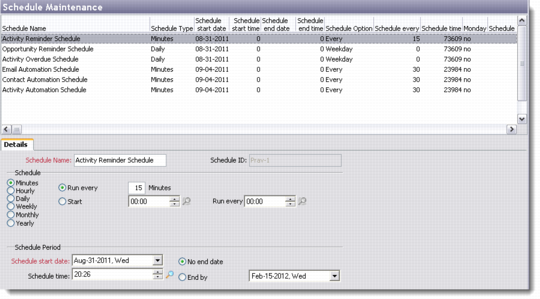
The Schedule Maintenance browser displays the list of schedules available in the database. You can add, edit, copy, and delete schedules through this screen.
Schedule Maintenance
Details
Use the Details tab to record basic information about a new schedule.
Schedule Name
Enter the name of the new schedule you are adding.
Schedule ID
This refers to a unique ID automatically generated by the system when you save the new schedule.
Schedule
Click the appropriate radio button to select a time line for the new schedule. Specify the schedule interval and pattern.
Schedule Start Date
Enter the start date of the new schedule.
No End Date/End By
Select the appropriate radio button to specify whether the schedule is effective indefinitely. If you choose End By, enter an end date.
Schedule Time.
Enter the start time of the new schedule.