Sales Quote
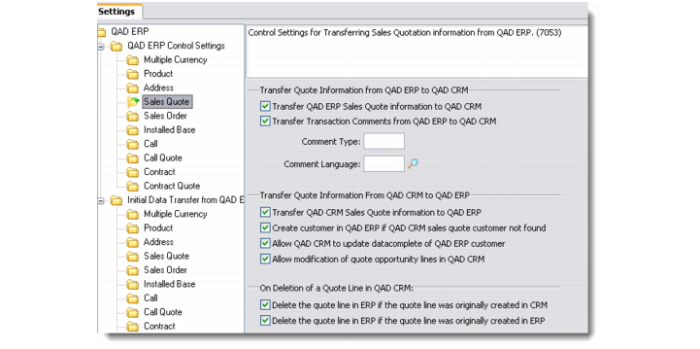
Use this option to define control settings for transferring sales quotation information to and from QAD Enterprise Applications.
Sales Quote
From QAD ERP to QAD CRM
Transfer QAD ERP Sales Quote Information to QAD CRM
Select this check box to enable the transfer of sales quotation information from QAD Enterprise Applications.
Transfer Transaction Comments from QAD ERP to QAD CRM
Select this check box to enable the transfer of transaction comments from QAD Enterprise Applications.
Comment Type
Enter comment type for the transaction.
Comment Language
Choose a comment language from the lookup.
From QAD CRM to QAD ERP
Transfer QAD CRM Sales Quote information to QAD ERP
Select this check box if you want to transfer quote lines from QAD CRM to QAD Enterprise Applications.
Create customer in QAD ERP if QAD CRM sales quote customer not found
Select this check box if you want the details of the QAD CRM sales quote customer to get recorded automatically in QAD Enterprise Applications during the transfer of sales quote information. This option applies to those cases where a particular QAD CRM prospect does not exist in the QAD Enterprise Applications database.
Allow QAD CRM to update datacomplete of QAD ERP customer
This option applies to QAD Enterprise Applications – Enterprise Edition only. When you create a customer in QAD Enterprise Applications – Enterprise Edition, before you can create any transactional record against the customer (for example, a sales quote), you need to access the customer record in the Customer Data Maintenance screen and complete all the data. When you complete all the data, QAD Enterprise Applications sets the datacomplete flag. Once the datacomplete flag is true, you can create any transactional records against the customer.
Select this option if you want QAD CRM to assign the mandatory data from the customer template record and assign the datacomplete flag.
If this option is not selected, you will not be able to create sales quotes against a Profile record if it is not already linked to a customer.
Allow modification of quote opportunity lines in QAD CRM
Select this check box if you want QAD Enterprise Applications users to be able to modify quote opportunity lines in QAD CRM for quotes created in QAD Enterprise Applications.