Installed Base
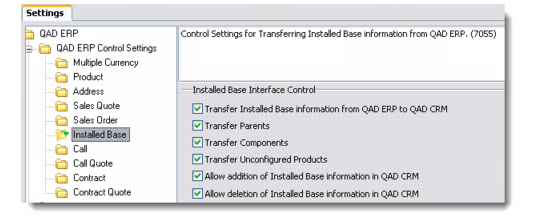
Use this option to define control settings for transferring installed base information from QAD Enterprise Applications.
Installed Base
Transfer Installed Base information from QAD ERP to QAD CRM
Select this check box to enable the transfer of installed base information from QAD Enterprise Applications.
Note: In QAD Enterprise Applications, whenever an installed base is created, depending on the system settings, the system creates multiple installed base records. For example, if the selected product is a configured product, the system will create installed base records for all the components of the configured product as well as its corresponding parent.
Transfer Parents
Select this check box to transfer installed base records where its product is classified as a parent.
Transfer Components
Select this check box to transfer installed base records where its product is classified as a component.
Transfer Unconfigured Products
Select this check box to transfer installed base records where its product is classified as unconfigured.
Allow addition of Installed Base information in QAD CRM
Select this check box to let QAD CRM create new installed base records whenever installed base information is transferred from QAD Enterprise Applications.
Allow deletion of Installed Base information in QAD CRM
Select this check box to let QAD CRM delete installed base records whenever the corresponding installed base record gets deleted in QAD Enterprise Applications.