Call
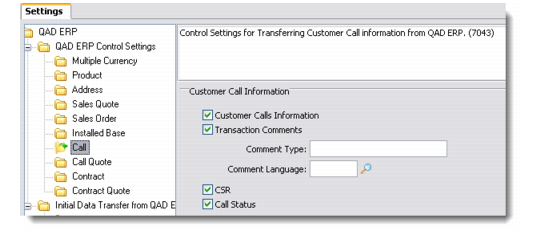
Use this option to define control settings for transferring customer call information from QAD Enterprise Applications. Call records in QAD Enterprise Applications are mapped to Issues in QAD CRM.
Call
Customer Calls Information
Select this check box to activate the transfer of customer call information from QAD Enterprise Applications.
Note: This is the main control that enables the transfer of calls. Clearing this check box makes the subsequent comments-related check boxes unavailable.
Transaction Comments
Select this check box to enable the transfer of transaction comments.
Comment Type
Enter a comment type for the transaction.
Comment Language
Choose a comment language from the lookup.
CSR
Select this check box to enable the transfer of engineer information from QAD Enterprise Applications. Engineer records are mapped to CSRs in QAD CRM.
Call Status
Select this check box to enable the transfer of call status information.