Splitting UI and Backend Programs on the Deployment Server
Perform the following steps on the CRM deployment server:
1 If you are using a Unicode database, update the file named QADCRMInstallDir/qadcrmparam_wc.pf with the following parameters:
-cpinternal UTF-8
-cpstream UTF-8
-cpcoll ICU-UCA
-cpcase Basic
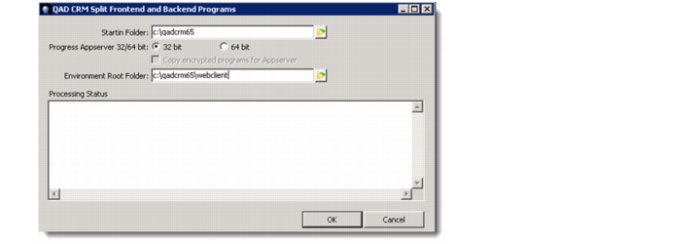
2 From QAD CRM deployment utility screen, select the button Split User Interface and Backend QAD CRM programs. A screen similar to the one shown below appears.
At this point, you might encounter the following warning messages:
Remote Appserver connection could not be established. Validate QAD CRM Appserver Information using QAD CRM Deployment tool.
You must only generate.cab file for CRM Webclient only when AppServer connection is established successfully. Do you still wish to proceed?
Answer Yes to continue with the file splitting; the AppServer setup will be carried out in later steps, before the generation of the CRM Webclient cab files.
3 Select the Startin folder as QADCRMInstallDir; for example: c:\qadcrm661\. This is selected by default.
4 Progress AppServer 32/64 bit : select 32 bit option (default). Copy Encrypted programs for AppServer is disabled in this case.
Note: If you have the AppServer configured on a 64-bit machine, you must recompile all the CRM backend programs on the AppServer machine. In that case, select the Progress AppServer 64-bit option and also select the check box labeled Copy Encrypted programs for AppServer.
All CRM programs that require recompilation on the backend in that case are copied under QADCRMInstallDir\webclient\backend folder; for example: c:\qadcrm661\webclient\backend
Select the environment root folder as QADCRMInstallDir\webclient; for example: c:\qadcrm661\webclient
5 Click OK to start processing
• A log file will be generated in the QADCRMInstallDir\log folder that contains error information. After you have run the above utility, it will create various subfolders under QADCRMInstallDir\webclient\frontend (in this example, c:\qadcrm661\webclient\frontend): contains CRM code and other files required to make the CRM cab file.
• QADCRMInstallDir\webclient\backend (in this example, c:\qadcrm661\webclient\backend): contains all the code that is required on the backend server. With a 64-bit AppServer, this will contain the source code of programs that need to be copied to 64-bit AppServer machine and recompiled there.