Splitting and Compiling UI and Backend QAD CRM Programs
Perform the following steps on the CRM deployment server:
1 If you are using a Unicode database, update the file named QADCRMInstallDir/qadcrmparam_wc.pf with the following parameters:
-cpinternal UTF-8
-cpstream UTF-8
-cpcoll ICU-UCA
-cpcase Basic
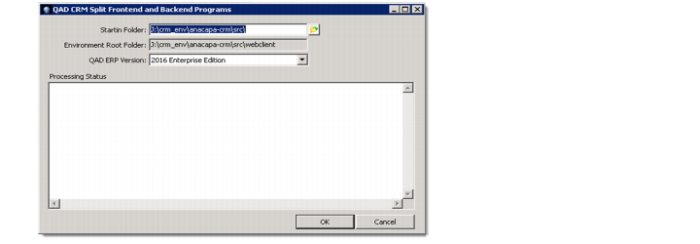
2 From the QAD CRM deployment utility screen, select the button Split and Compile UI and Backend QAD CRM Programs. A screen similar to the one shown below appears.
3 Select the Startin folder as QADCRMInstallDir; for example: c:\qadcrm661\. This is selected by default.
All CRM programs that require recompilation on the backend in that case are copied under QADCRMInstallDir\webclient\backend folder.
By default, the environment root folder is set to QADCRMInstallDir\webclient.
Select QAD Enterprise Edition version with which you are trying to integrate CRM.
4 Click OK to start processing
• Two log files will be generated in the QADCRMInstallDir\log folder that contains error information. After you have run the utility, the system creates various subfolders under QADCRMInstallDir\webclient\frontend contains CRM code and other files required to make the CRM cab file.
After you have run the above utility, the system automatically compiles all the CRM UI programs required for CRM WebClient against your existing CRM databases and generates the .r files.
• QADCRMInstallDir\webclient\backend: contains all the code that is required on the backend server. It will contain the source code of programs for QAD CRM backend. In YAB environment, you can ignore the files in this folder as these are automatically configured.