Setting Environment Variables
You can set the environment variables:
• Temporarily for a session
• In a batch file or a shell script
• As user-specific variables
• As system variables
The environment variables set in a batch file or a shell script will overrule the environment variables set as user variables. The user-specific variables overrule the environment variables that are set as system variables.
Applications may also use their own files (for example, .ini files, .cfg files, and so on) and/or store environment settings specific to the application in the registry. These application-specific configuration files and registry settings overrule any other environment variable you have set.
Setting Temporary Variables
Use the following command to set an environment variable on a Windows system:
set variablename = variablevalue
To remove the environment variable, use:
set variablename =
Note: Ensure that you set the variable again when you close the command window or when you restart the system.
Setting Variables in a Batch File or a Shell Script
To set the environment variable, use:
set variablename = variablevalue
To remove the environment variable, use:
set variablename =
Important: Ensure that you set the variable again when you close the command window or when you restart the system.
Setting User Variables:
1 On the Windows desktop,
• Right-click Computer and then select Properties (for Windows Server 2008).
• Right-click My Computer and then select Properties (for Windows Server 2003).
2 Click Advanced System Settings to open the System Settings dialog box.
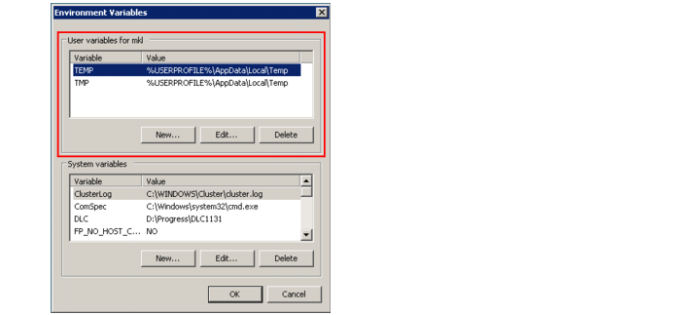
3 On the Advanced tab, add, change, or delete a user-specific environment variable.
Setting User-Specific Variables
Setting System Variables
1 On the Windows desktop,
• Right-click Computer and then select Properties (for Windows Server 2008).
• Right-click My Computer and then select Properties (for Windows Server 2003).
2 Click Advanced System Settings to open the System Settings dialog box.
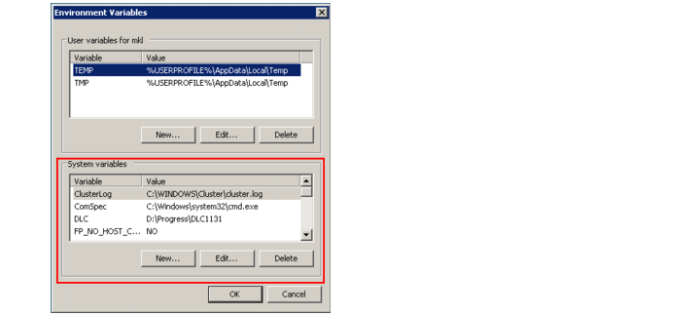
3 On the Advanced tab, add, change, or delete a system environment variable.
Setting System Variables