Sending Customer Profiles to Enterprise Applications
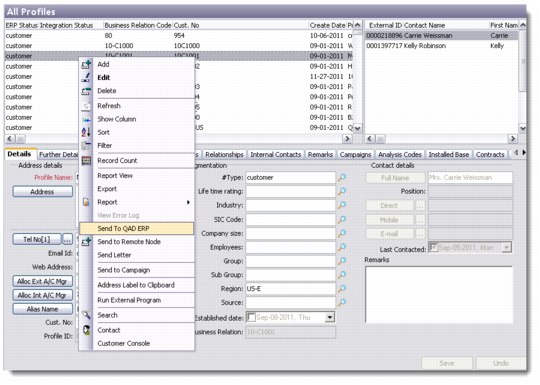
When a profile is newly created in CRM, the user is prompted to send the profile to Enterprise Applications. The user can choose to do so at this point or optionally to send the profile to ERP at a later point by selecting the profile in the browse in the All Profiles function and using the right-click menu option as shown below.
All Profiles Functions
If the integrated system is QAD Enterprise Applications Standard Edition, the integration creates a customer record in the appropriate domain in Enterprise Applications. The integration uses the standard ERP function to automatically allocate the next customer number. This customer number is stored in the Cust No field on the profile in CRM. In addition, the ERP Status value is set to “Customer” and if it is not already present, the value “Customer” is also added to the Profile Type field.