Maintaining Unit of Measure Codes
Units of measure are values that specify any type of quantifiable unit and are typically associated with products. Units of measure might describe dimensions, weights, volumes, or amounts of a particular product. Examples defined in the system include values such as each (EA), milliliter (ML), or pound (LB).
Example: Your organization sells automotive components. A product such as wiring employs a unit of measure that uses weight; a cooling system component employs a unit of measure that uses a single component (EA).
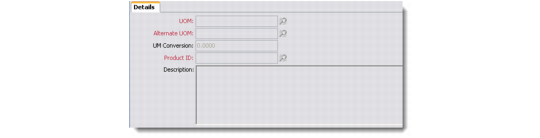
Use the Unit of Measure Details screen to maintain unit of measure codes.
1 Choose Sales Management|Products|Unit of Measure or Marketing Management|Products|Unit of Measure. The Unit of Measure browser displays the units currently defined in the system.
2 Right-click the Unit of Measure browser and choose Add from the menu.
Note: This menu also contains other options for maintaining units of measure.
Unit of Measure Details
Unit of Measure (UOM)
Enter a unit of measure code.
Alternate UOM
Enter an alternate unit of measure code.
UOM Conversion
Enter a ratio of the unit of measure to the alternate unit of measure.
Product ID
Enter a product associated with this unit of measure.
Description
Enter a brief description of the unit of measure.