Creating Sections and Subsections
When a script is created, it is given a section by default. Sections allow long scripts to be broken into phases, or into a series of related questions within a script. Sections can, in turn, have subsections for increased granularity. A script can have as many sections or subsections as required. Sections and subsections are specific to a script and cannot be shared among scripts.
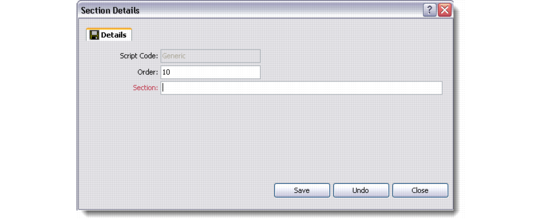
Use the Section Details or Subsection Details dialog box to create a section or subsection. The dialog box for sections and subsections is identical.
1 Do either of the following:
a To create a section, right-click the script and choose New Section from the right-click menu.
b To create a subsection, right-click a section and choose New Subsection from the right-click menu.
Note: This menu also contains additional options for working with sections and subsections, such as Edit and Delete.
2 The Details dialog box displays.
Section/Subsection Details
3 Enter a value in the Order field to determine the order of the section or subsection within the script.
In order to leave room for additional sections, it is recommended values be entered in increments of 10. For example, if creating a section, enter 0 to make this the first section in the script, 10 for the next section, and so on.
4 Enter the title of the section or subsection in the text box.