Managing Media Sources
The Media Source sub-module helps maintain details about the chosen media source for a campaign. The media source is the medium through which a campaign is carried out, such as advertisements, television commercials, or newspaper articles.
Since these media typically cost a significant amount, expenses related to them should be included in the cost of campaigns. The Media Source sub-module helps you compute these costs and manage them through the various stages of a campaign.
Choose Main Menu|Marketing Management|Marketing Campaigns|Media Source to open the Media Source screen.
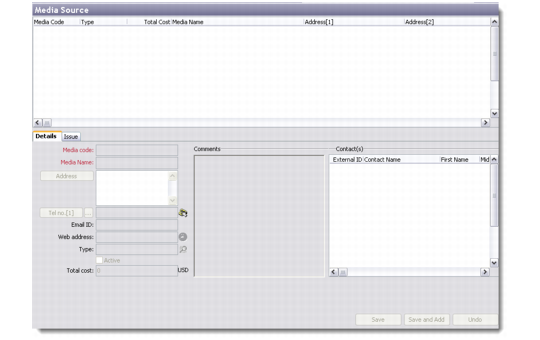
The Media Source screen has two parts—the top half is a browser displaying the list of media sources attached to existing campaigns in the database, while the bottom half opens the source details for the selected campaign in edit mode.
Media Source
The Media Source screen lets you add, edit, copy, and delete source details for the selected campaign record.
Details
Use the Details tab to record basic contact information about a new media source for a campaign.
Media code
Enter a unique code for the new media source. This is a mandatory field.
Media Name
Enter the name of the new media source. This is a mandatory field.
Address and other details
Enter the address, telephone number, mail ID and web address of the new media source.
Type
Select the media type from the look-up provided.
Total cost
This field is automatically populated by the system from the total cost entered in the Campaign sub-module.
Comments
Record comments regarding the media source.
Contacts
Enter contact details related to the new media source here by right-clicking and choosing Add. This displays the Contact Details screen.
Issue
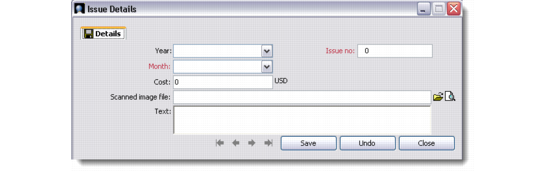
Use the Issue tab to record details regarding the media source.
Year
Select or enter the year of the media campaign.
Issue no
Enter the issue number of the media campaign. This is a mandatory field.
Month
Select the month in which the media campaign will take place. This is a mandatory field.
Cost
Enter the cost of the media source being used for the campaign.
Scanned image file
Attach a scanned image file of the media campaign, if available.
Text
Enter freeform text related to the media campaign here. This is typically used for magazine and newspaper campaigns.
Issue Details