Managing Service Queues
Issue management uses service queues to categorize issues and assign them to service personnel. Each service organization must set up these queues based on business requirements.
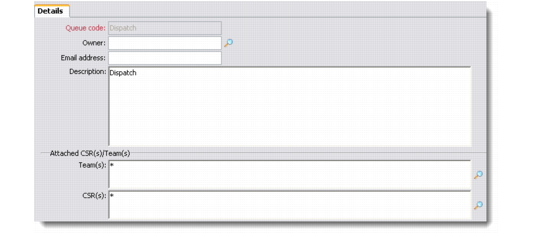
Use the Service Queues Details screen to maintain service queues in your system. You can define as many service queues as required to fulfill the requirements of your customer service operation. You can define the owner of the service queue, specify contact information, and assign teams and individual CSRs to the queue.
Only users belonging to an assigned team—or those assigned individually—can access the issues for that queue. If a queue is not assigned to a team or individual, then it is available to all users and any user can select issues from any queue for processing.
1 Choose Customer Service|Service Queues. The Service Queues browser displays the service queues currently defined in the system.
2 Right-click the Service Queues browser and choose Add from the menu.
Note: This menu also contains options for deleting and editing existing queues.
Service Queues Details
Queue Code
Enter a unique code to identify the service queue.
Owner
Enter the owner of the service queue. The owner will be responsible for resolving the customer issues represented by the issues.
Email Address
Enter the e-mail address that is assigned to this queue.
Description
Enter a description of the service queue.
Provide the following information about teams or individual CSRs associated with the service queue.
Team
Enter a team to associate with the service queue. Any member of the assigned team can handle an issue for the service queue.
CSR(s)
Enter the individual CSRs associated with the service queue. A CSR must be a user already defined in the system. When the CSR logs in to the system, the system detects their user ID and provides them access to their assigned service queues.