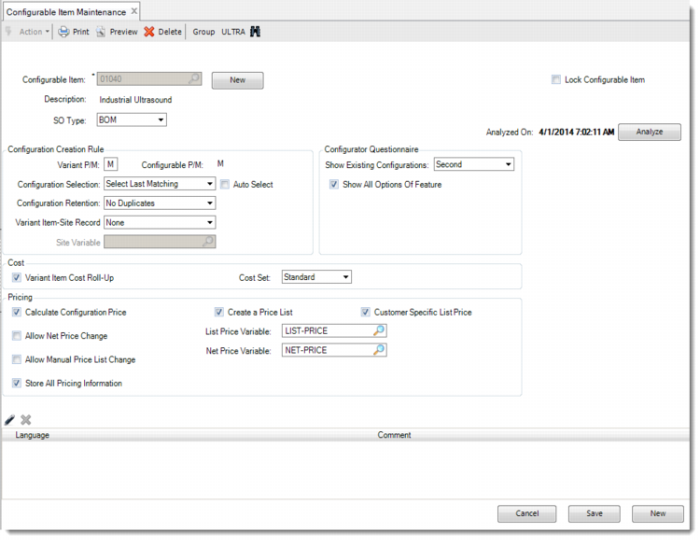
Configurable Item Maintenance
In the System Setup section, we reviewed the product structure of the Industrial Ultrasound. If you want QAD Configurator to configure variants of this item, you must define the Industrial Ultrasound as a configurable item. If you are dealing with a multi-level product structure, you must also define every lower-level configurable item as a configurable item in QAD Configurator as well. If it recognizes an item as a configurable item, QAD Configurator references the product structure entered in the Manufacturing module whenever it has to.
The item number is copied to the QAD Configurator database when you define an item as a configurable item using Configurable Item Maintenance.
Note: All item data, such as product structures and routings, are only maintained in the QAD Enterprise Applications database. There is no duplication of data.
Exercise 3: Configurable Item Maintenance
Once an item is a configurable item, QAD Configurator is automatically launched when this item is entered on a sales quotation or sales order line.
Run Configurable Item Maintenance and click the New button to display the item browse. Select the items listed in the following table and set the attributes. Make sure that group ULTRA is selected. Accept the default value of all the other fields.
Configurable Item | Description | SO Type | Configuration Selection / Retention | Variant Item Cost Roll-Up | Cost Set |
01040 | Industrial Ultrasound | BOM | Select Last Matching Auto Select: Off No Duplicates | yes | Standard |
50020 | Industrial Housing | BOM | Select Last Matching Auto Select: Off No Duplicates | yes | Standard |