Variable and Variable Options Definition
Variables are general characteristics of items. Because many items can have the same characteristics, it would not be a good idea to maintain the characteristics of every item separately. So we first define the variables that we need, and then link them to the items. Depending on the data type of a variable we can define a set of possible values for it.
Exercise 6: Variable Maintenance
Run Variable Maintenance to define the variables and options for the configurable items.
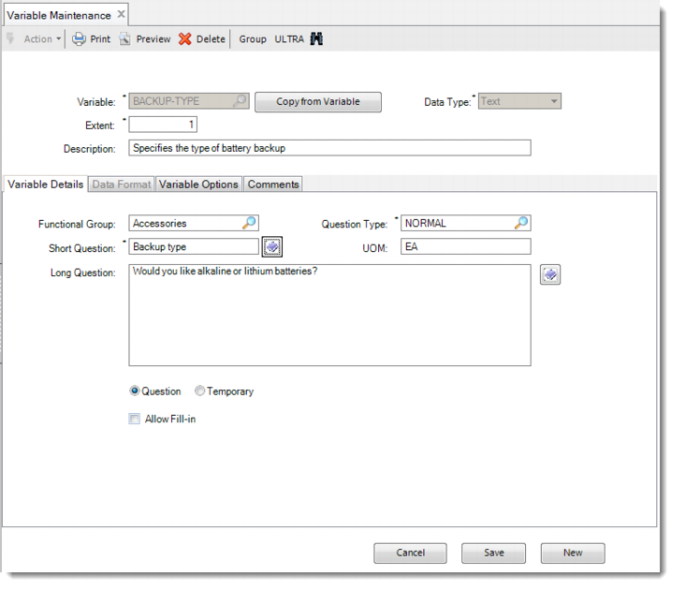
Create the variables that are listed in the following table. Keep the default value 1 for Extent. You can add Long Question texts to the variables.
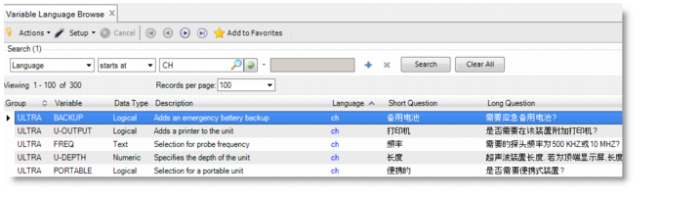
Note: You can specify short and long questions in any of the QAD supported languages. The short question can be up to 64 characters in length. You can also maintain the question in multiple languages. Click the String Translation button next to the question field, and enter the translation on the String Translation screen. To display the short and long question of each variable in each language, you can use Variable Language Browse.
Variable Language Browse
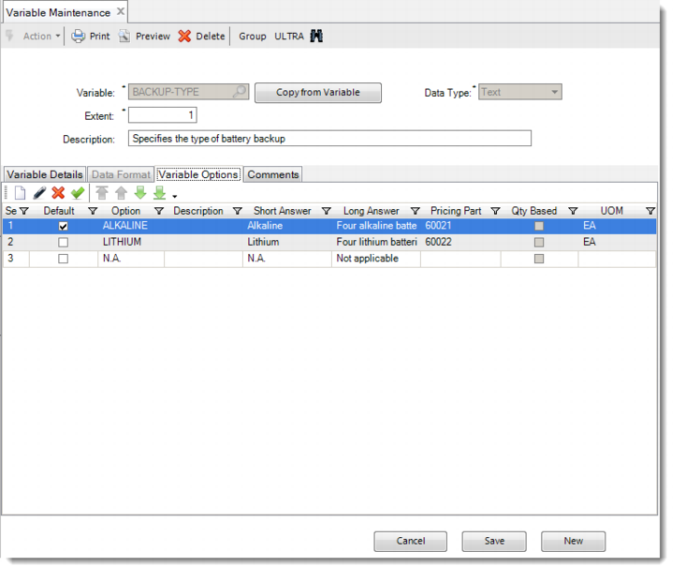
The options are specified in the Variable Options tab and the numeric parameters are specified in the Data Format tab. When you enter variable options, use the arrow buttons on the toolbar to define the order in which you want the options to appear in the questionnaire. By default, the first option in the list is the default answer for the associated question. The entry N.A. stands for not applicable. Suppose that the answer to one question makes another question superfluous.
Note: If the variable is of type Text, Logical, Numeric List, or Date (Data Format = List), you can enter the option answers in any of the QAD supported languages. The short answer can be up to 64 characters in length. You can also maintain the answers in multiple languages. Click the String Translation button next to the answer field, and enter the translation on the String Translation screen. To display the answer for each variable option in each language, you can use Variable Option Language Browse.
Variable | Data Type | Functional Group | Question Type | Short Question | UM | Question / Temporary | Variable Options or Data Format |
backup | Logical | Accessories | Normal | Backup | EA | Question | Yes No |
backup-type | Text | Accessories | Normal | Backup Type | EA | Question | Alkaline NiCd LiS N.A. |
country | Text | Technical Specs | Normal | Country | EA | Question | N/A [See note] |
CPU | Text | Technical Specs | Normal | CPU | EA | Question | Standard High |
Freq | Text | Technical | Normal | Frequency | EA | Question | 500kHz. 10MHZ |
Painted | Text | Technical | Normal | Painted | EA | Question | Painted Stainless |
Portable | Logical | Technical Specs | Normal | Portable | EA | Question | Yes No |
power | Text | Technical Specs | Normal | Power Converter | EA | Question | Smart Standard |
steel-large | Numeric | Style and Size | Special | Qty - Large Steel | EA | Question | Digits: 8 Decimals: 0 |
steel-small | Numeric | Style and Size | Special | Qty - Small Steel | EA | Question | Digits: 8 Decimals: 0 |
U-area | Numeric | Style and Size | Special | Area | EA | Question | Digits: 8 Decimals: 0 |
U-color | Text | Style and Size | Normal | Color | EA | Question | Black White Other |
U-Cover | Logical | Accessories | Normal | Keyboard Cover | EA | Question | Yes No |
U-height | Numeric | Style and Size | Normal | Height | EA | Question | Digits: 3 Decimals: 0 Minimum: 80 Maximum: 200 Multiplier: 40 Default: 120 |
U-depth | Numeric | Style and Size | Normal | Length | EA | Question | Digits: 3 Decimals: 0 Minimum: 60 Maximum: 100 Multiplier: 20 Default: 60 |
U-type | Text | Style and Size | Normal | Display Type | EA | Question | Top Display Front Display |
U-width | Numeric | Style and Size | Normal | Width | EA | Question | Digits: 3 Decimals: 0 Minimum: 60 Maximum: 160 Multiplier: 20 Default: 60 |
U-output | Logical | Accessories | Normal | Printer | EA | Question | Yes No |
Note: A single variable can have more than one meaning. By defining a number of extents for such a variable, you can distinguish between its various meanings. For instance, if both the housing and the icemaker have a color, you can define a variable color and give it extent 2. Then you can use color[1] for the housing color and color[2] for the icemaker color.
Note: The industrial ultrasound is sold in many countries. To avoid entering each country as a variable option, use the QAD Configurator browse feature. When Allow Fill-In is selected, you can also associate the variable with an existing browse. If you assign a browse code to the variable, you can select an answer from the browse, instead of manually typing in the answer.
Assign the following values to variable country.
Variable | Allow Fill-In | Browse Code |
country | Yes | ad015 |