Remarks and Exercises on Rule Modes
A rule generally consists of one preposition (IF), one conclusion (THEN), and possibly one alternative (ELSE). These clauses can contain one or more lines and can have different formats: basic, advanced, and free format.
A basic clause looks like the following:
Variable = option.
The rules you entered previously are of this type (all clauses are now in normal mode), for instance:
If portable = Yes then country = "N/A" else country <> "N/A"
An advanced clause is used to enter slightly more complicated expressions.
Variable = expression.
Example: The THEN clause here is in advanced mode.
If housing-type = Single Door Front then housing-length = 0.5 * housing-width + 0.1 * housing-height.
A free format clause can be used to create complex rules. A clause of this type contains a Boolean expression which is true or false. This rule mode is only available for if-clauses. A rule of the free format type cannot be converted back to another rule format. So when you select the free format rule mode, the system always prompts you to confirm your choice.
Here is an example:
If 0.1 * (U-width * U-depth) > 0.5 * (U-width + U-height) then backup = yes.
Practice with the different rule modes that are available.
Exercise 13: General Rule Maintenance: Advanced Mode
When only a Then clause is defined, an assignment rule is created. An assignment rule is executed each time a question is answered in the questionnaire.
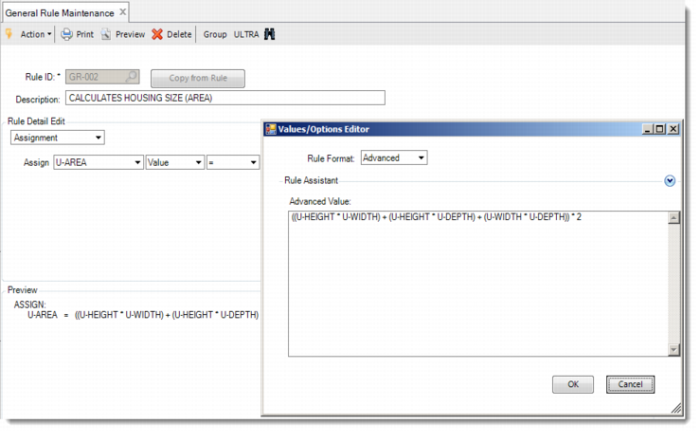
Now run General Rule Maintenance and enter the rule GR-002. In the Rule Detail Edit frame, select Assignment from the list box. Select a feature from the Assign list box, click Values/Options, and select the Advanced rule format. Now you have an advanced window in which you can type the remaining part of your then-statement. You can also use the Rule Assistant to enter it.
Rule ID | Item-Specific Rule |
GR-002 | U-area = ((U-height * U-width) + (U-height * U-depth) + (U-width * U-depth)) * 2 |
Notice that this clause is now saved as an assignment rule because it only contains a THEN-clause. Now run Rule Group Maintenance and link Rule GR-002 to Rule Group RG-001.
Exercise 14: Item Rule Maintenance: Free Format Mode
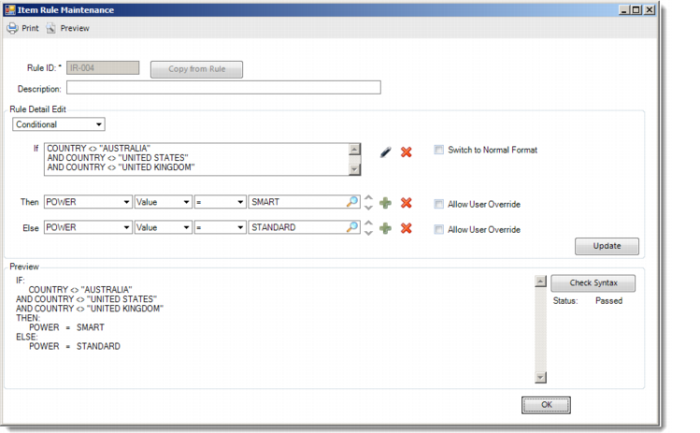
Run Item Rule Maintenance. Enter the rule by selecting Switch to Free Format in the If clause:
Item | Rule ID | If Clause | Then Clause | ELSE Clause |
01040 | IR-004 | country <> “AUSTRALIA” AND country <> “UNITED STATES” AND country <> “UNITED KINGDOM” | power = Smart | power = Standard |
Update the rule and verify your rule using the Check Syntax button.
General Rule ID | Rule Group to Link this Rule to |
GR-002 | RG-001 |