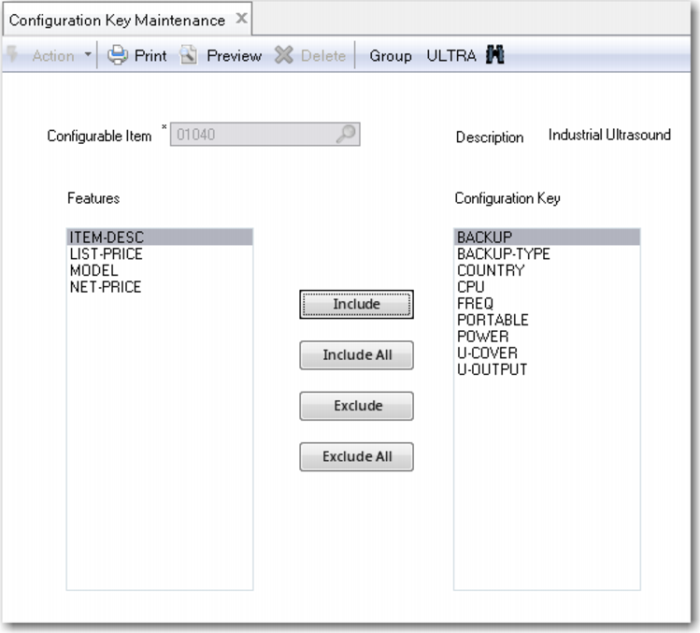
Configuration Key Maintenance
Use Configuration Key Maintenance to specify which features uniquely identify a configuration. The system automatically matches every new configuration with the existing ones based on the configuration key. If it finds existing configurations that match the one you defined, the system suggests you use the existing one instead of creating one. In this way, the item database does not grow unnecessarily.
QAD Configurator creates a configuration for every variant of a configurable item. So you have to define configuration keys for each configurable item in the generic multi-level product structure.
Now suppose that after some time you want to change the configuration key defined earlier. The system automatically updates the configuration key of existing configurations when a record is saved in Configuration Key Maintenance.
Exercise 18: Configuration Key Maintenance
Run Configuration Key Maintenance. Select the Industrial Ultrasound (item 01040) and create a configuration key consisting of the features that are shown in the following table. Repeat this procedure for the lower level configurable item 50020
Item | Configuration Key |
01040 | backup backup-type country CPU freq portable power U-cover U-output |
50020 | painted U-type |
To specify configuration keys for a configurable item:
1 Specify a configurable item in the Configurable Item field.
2 To set a feature as a configuration key, select it in the Features list box and click Include to move it to the Configuration Keys list box. Click Include All to set all available features as configuration keys.
To remove a configuration key, select it in the Configuration list box and click Exclude to move it to the Feature list box. Click Exclude All to remove all configuration keys.
3 Click Save.