Variant Product Structure Rule Maintenance
Use Variant Product Structure Rule Maintenance to define selection rules for component items of a configurable item. If no selection rule is defined for a component in the generic product structure, the component is always selected in the variant product structure. The exception is that the parent item of the component is not selected due to selection rules.
Exercise 22: Variant Product Structure Rule Maintenance
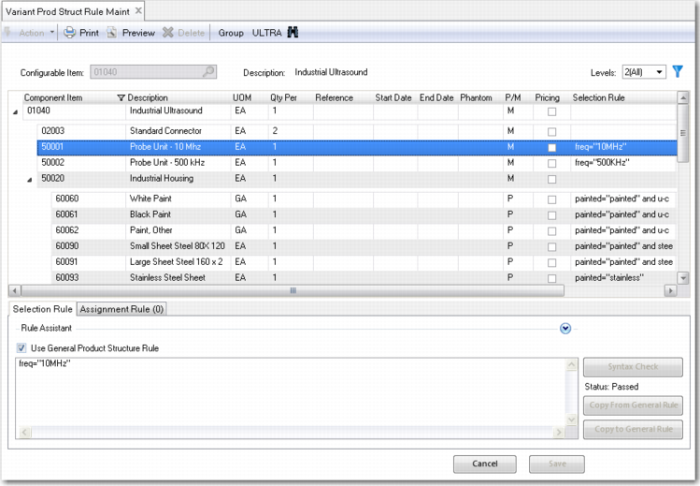
Run Variant Product Structure Rule Maintenance and select configurable item 01040. Click a certain component and you can see the Selection Rule section in the lower part of the screen. In the Selection Rule section, you can enter the rule that specifies when that component is selected.
In the Assignment Rule tab in the lower part of the screen, you can assign values to all fields in QAD EA Product Structure Master table (ps_mstr). You can view all field names by using the Insert/Update button and then clicking the browse.
If you do not specify a selection rule for a component, the component is always selected. If you do not specify any assignment rules, the system copies the values from the generic product structure to the variant product structure.
Now add the first selection rule step by step.
Configurable | Component | Description | Selection Rule |
01040 | 60080 | Power cord, UK | Portable = No and country = “UNITED KINGDOM” |
Enter this rule by following these steps:
1 Run Variant Product Structure Rule Maintenance.
2 Enter the parent configurable item 01040, and select Level 2(All).
3 Click component item 60080.
4 Position the cursor in the Selection Rule field in the Selection Rule tab.
5 Now type: portable = No and country= “UNITED KINGDOM” or use the Rule Assistant to enter this expression.
6 Click the Check Syntax button.
7 If the rule is not correctly entered, solve the problems.
8 Click the Save button.
Now add the following selection rules. Try to understand why they are specified this way. For example, item 50020 is always selected, since it does not have a selection rule. Similarly, components 02003, 60001, 60003, 60020 and 90093 are always selected.
Note: Leave the Use General Product Structure Rule check box unchecked.
Do not enter anything for the other components. They are always selected.
Configurable Item | Component | Description | Selection Rule |
01040 | 60005 | Battery | portable = Yes |
| 60008 | Printer | U-output = Yes |
| 60015 | Keyboard Cover | U-cover = Yes |
| 60080 | Power Cord - UK | Portable = No and country = “UNITED KINGDOM” |
| 60081 | Power Cord - Australia | Portable = No and country = “AUSTRALIA” |
| 60082 | Power Cord - USA | Portable = No and country = “UNITED STATES” |
| 60083 | Power Cord - Universal | Portable = No and country <> “UNITED KINGDOM” AND country <> “AUSTRALIA” AND country <> “UNITED STATES” |
| 60021 | Battery Backup, Alkaline | backup-type = “Alkaline” |
| 60023 | Battery Backup, NiCd | backup-type = “NiCd” |
| 60022 | Battery Backup, Lithium | backup-type = “Lithium” |
| 60088 | Power Converter - Standard | Power = “Standard” |
50020 | 60060 | White Paint | Painted = “painted” and u-color = “white” |
| 60061 | Black Paint | Painted = “painted” and u-color= “black” |
| 60062 | Paint, Other | Painted = “painted” and u-color <> “white” and u-color <> “black” |
| 60090 | Small Sheet Steel, 80x120 cm | Painted = “painted” and steel-small > 0 |
| 60091 | Large Sheet Steel, 160x200 cm | Painted = “painted” and steel-large > 0 |
| 60093 | Stainless Steel Sheet, 80x120 cm | Painted = “stainless” |
| 60093 | Stainless Steel Sheet, 160*200 cm | Painted = “stainless” |
Now go back to configurable item 01040 and make sure that the following selection rules are added.
Note: These components use General Product Structure Rules.
Configurable Item | Component | Description | Selection Rule |
01040 | 50001 | Probe Unit - 10MHz | freq = “10MHz” |
| 50002 | Probe Unit - 500kHz | freq = “500kHz” |
| 60050 | Base Unit / CPU | CPU = “Standard” |
| 50052 | High Performance CPU | CPU = “High” |
Now enter the following assignment rule for component item 60089:
Configurable Item | Component | Field | Assignment Rule |
01040 | 60089 | ps_rmks | “This ultrasound unit requires a small power converter. Include instructions.” |
Now go back to configurable item 50020 and enter the following assignment rules:
Configurable Item | Component | Field | Assignment Rule |
50020 | 60060 | ps_qty_per | ps_qty_per * U-area / 100000 |
| 600601 | ps_qty_per | ps_qty_per * U-area / 100000 |
| 60062 | ps_qty_per | ps_qty_per * U-area / 100000 |
| 60062 | Ps_rmks | “Customer has specified non-standard color - check order for details” |
| 60090 | ps_qty_per | steel-small |
| 60091 | ps_qty_per | steel-large |