Variant Routing Rule Maintenance
Use Variant Routing Rule Maintenance to define selection rules for operations in the generic routing. If no selection rule has been defined in the generic routing, the operation is always selected in the variant product structure.
Exercise 23: Variant Routing Rule Maintenance
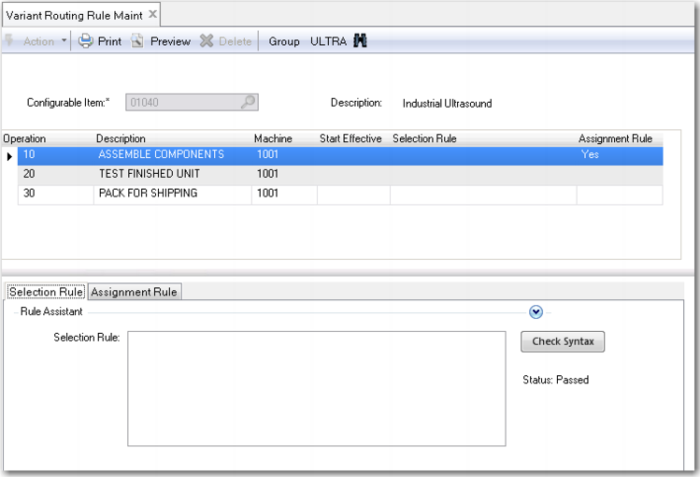
Run Variant Routing Rule Maintenance and select configurable item 01040.
The system now lists all the operations in the item’s generic routing. Again, this screen has two parts: Selection Rule and Assignment Rule.
• In Selection Rule, you define when to select an operation.
• In Assignment Rule, you can assign values to all fields in QAD EA Routing Operation Detail table (ro_det). You can see all the available fields by using the Insert/Update button and then clicking the browse.
If you do not enter a Selection Rule, the operation is always selected. If you leave the Assignment Rule empty, the system copies the values from the generic routing to the variant routing.
Now add the Selection and Assignment Rules for the configurable items 01040 and 50020 as listed in the table.
The first Assignment Rule: if backup is yes, then runtime for operation 10 is the current runtime of operation 10 plus 0.15 hour; otherwise, use the current runtime.
The second Assignment Rule: if unit depth, width and height exceed 80, 80 and 120 respectively, runtime for operation 10 is 1.5 hour; otherwise, it is 1 hour.
The third assignment rule updates the operation description of operation 20 with the color of the paint to use.
Configurable Item | Operation | Selection Rule | Field | Assignment Rule |
01040 | 10 | | ro_run | if backup = yes then (ro_run + 0.15) else ro_run |
50020 | 10 | | ro_run | if u-height>120 and u-width>80 and u-depth>80 then 1.5 else 1 |
| 20 | painted <> “stainless” | ro_desc | “Paint” + u-color |
Notice that the operations for 01040 are always selected. The same is true for operation 10, 30 and 40 of item 50020. Operation 20 for item 50020 is only selected if bee stainless steel has not been selected.
Exercise 24: Variant Routing Maintenance
Features can also be used to populate comments in the variant routing. Those comments can provide additional instructions and information to the personnel operating the assembly line.
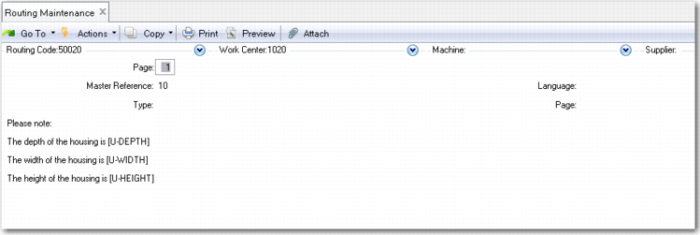
Use Routing Maintenance (14.13.1) in the Manufacturing module to enter the following comment for Routing Code 50020 and Operation 10. Enter Yes in the Comment field of this operation and then add the following comments:
The depth of the housing is: [U-depth]
The width of the housing is: [U-width]
The height of the housing is: [U-height]
When the variant routing is created, QAD Configurator replaces the placeholders with the actual value of the feature.