Element Roll-Up Rule Maintenance
You can use element roll-up to roll up non-cost related data elements in a variant product structure or routing.
The roll-up can contain:
• Item data (pt_mstr)
• Operation data (opm_mstr)
• Product structure data (ps_mstr)
• Routing data (ro_det)
Some roll-up examples are: runtimes, selling prices, weights, numbers, and sizes.
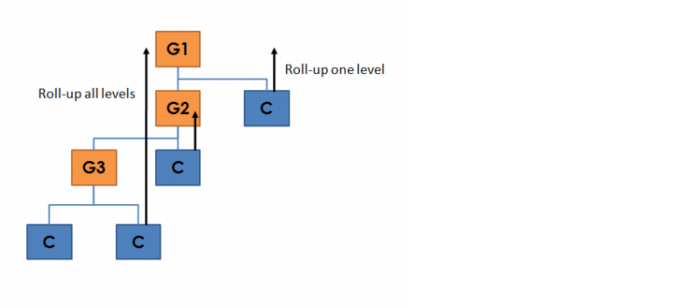
Roll-up rules can be executed one level up or all levels up and can consist of:
• Simple expressions containing a single element; for example: roll up pt_mfg_lead, which rolls up the production lead time of all components
• Complex expressions containing calculations; for example: roll up (component: pt_abc_qty / master: pt_dec01) * ps_qty_per
When rolling up data through all levels of the variant product structure, QAD Configurator does not store intermediate results in lower level configurable items. Only the total is stored with the variant item.
The next diagram shows examples of a one level roll-up (to the nearest parent item) and an all-level roll-up (to the uppermost parent item) for a variant product structure. A variant routing is handled similarly.
Exercise 25: Element Roll-up Rule Maintenance
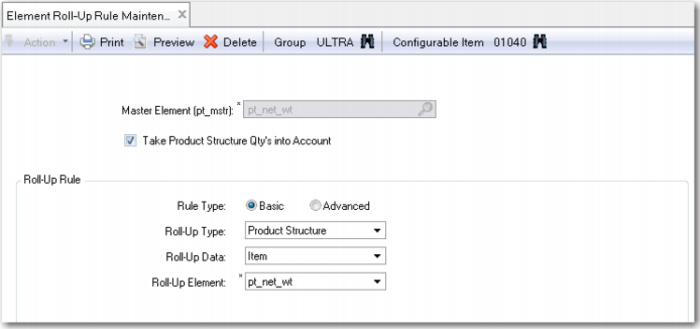
Run Element Roll-Up Rule Maintenance and enter the rule as listed in the table.
Use Element Rule Roll-Up Maintenance to create the following element roll-up rule for item 01040 and 50020:
Field | Entry |
Master Element | pt_net_wt |
Take Product Structure Qty’s into Account | Yes |
Rule Type | Basic |
Roll-Up Type | Product Structure |
Roll-Up Data | Item |
Roll-Up Element | pt_net_wt |