QAD Enterprise Asset Management 2016.1
>
User Guide
>
Introduction
>
EAM Modules
EAM Modules
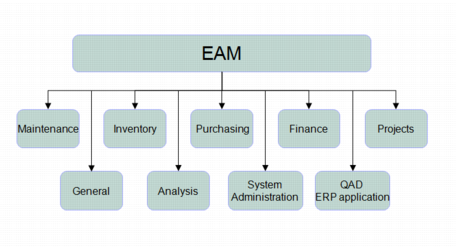
EAM groups related functionality into the following modules:
• Maintenance
• Inventory
• Purchasing
• Finance
• Project Accounting
• General
• Analysis
• System Administration
EAM Modules
Maintenance
Use Maintenance to drive work order functionality for maintenance and repair operations (MRO):
• Equipment
• PM/PdM
• Work Orders
• Service Requests
• Labor History
• Codes
• Documents
Inventory
Use Inventory to manage parts (inventoried and non-inventoried) across single or multiple plants, analyzing usage and reserves, and improving cost effectiveness:
• Inventory
• Physical Inventory
• Stock Replenishment
• Stores Requisition Lists
• Stores Requisition Approval Groups
• Rebuild Locations
• UOM Conversion
• Codes
• Documents
Purchasing
Use Purchasing to manage indirect purchasing (stock, non-stock, services):
• Purchase Orders
• Requisitions
• Blanket Orders
• Quotes
• Routing Substitutions
• Vendors
• Standard Clauses
• Currency
• Exchange Rates
• Approval Groups
• Codes
• Documents
Finance
Use Finance to manage accounting, taxes, overhead, and any money-related aspects of EAM operations:
• Accounting
• Tax
• Overhead
• Groups
• Codes
• Capitalization History
• Intercompany Accounts
• Documents
Project Accounting
Use Project Accounting under Finance to plan, track, and control detailed project budgeting for:
• Capital Projects
• Expense Projects
• Customer-Funded Projects
• Engineer-to-Order (ETO) projects
Project Accounts make status information on the entire budget or each job/phase of the budget readily available and visible by job spending limit or budget level.
General
Use General to set up common system properties:
• Business Units
• Business Segments
• Domains
• Sites
• Codes
• Employees
• Groups
• Revisions
Analysis
Use Analysis to display key information in an easy-to-use graphic format:
• Equipment
• Finance
• Inventory
• Labor
• PM
• Project
• Purchasing
• Service Requests
• System Administration
• Work Orders
System Administration
Use System Administration to alter menus, user permissions, roles, and system-wide configurable features:
• Users
• Roles
• User/Roles
• System Control
• ERP Interface
• User-Defined Fields
• Job Control
• System Sequence
• Site Sequences
• Registry
• Report Setup
• Mandatory Fields
• Req Reroute/Notify Fields
• PO Reroute/Notify Fields
• Screen Editor
• Report Designer
• User-Defined Mail
• Product Line
• Equipment Mapping to ERP
• Production Line Mapping to ERP
• Progress Editor
• Custom Programs
EAM and Other QAD Applications
EAM trades certain types of information with QAD’s enterprise resource planning (ERP) applications, which are hosted through an easily accessible, common .NET interface called the AppShell. Your EAM installation integrates seamlessly into the AppShell.