Authorize a Blanket Order
To authorize a blanket order, open the blanket order and select Authorize from the Action menu. Enter your user name and password and click OK.
When you select the Authorize action, the blanket order begins the approval routing process.
If you do not have a large enough spending limit, the blanket order is routed to the approval group. See
Blanket Order Approval Group.
If you have a large enough spending limit and the authority for the associated accounting structure and the approval group has no quality person, you can authorize the blanket order without going through routing.
View Approval Routing Status of a Blanket Order
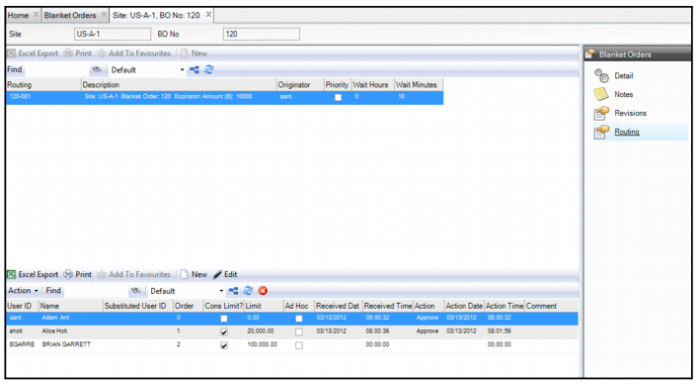
To view the authorization status for the blanket order, open the blanket order and select the Routing submenu.
The upper browse displays the routing records for the blanket order. Each time this blanket order is routed for approval, a record of that routing appears in this browse.
The lower browse shows the list of approvers for the selected routing. This browse displays the people who approved the blanket order, the people who need to approve the blanket order, and indicates if anyone has rejected the blanket order. With this information, you can easily see where the blanket order is in the approval process.
Note: If anyone in the approval group had any important notes regarding this blanket order, their notes are displayed in the Comments field.
Note: If you take too long to approve a blanket order, EAM provides a job in System Administration|Job Control that automatically forwards the routing approval to the next person on the list. See
Job Control Application.
Blanket Order Approval Routing Status