QAD Enterprise Asset Management 2016.1
>
User Guide
>
Projects
>
Jobs
>
Process Map–Setting Up a Job
Process Map–Setting Up a Job
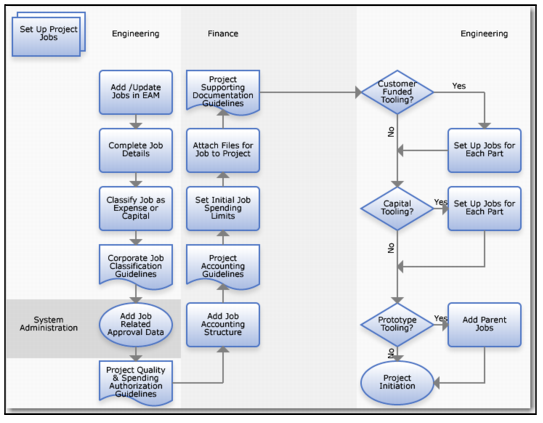
Set Up Job Process Map
1 Add or edit a job record, if needed.
2 Complete job details.
3 Classify the job expense type (expense or capital).
4 Verify compliance with corporate job classification guidelines.
5 Add job-related approval data.
6 Review and follow quality and spending authorization guidelines.
7 Add the job accounting structure.
8 Review and follow project accounting guidelines.
9 Set the initial job spending limits.
10 Review and follow supporting documentation guidelines for projects and jobs.
11 Set up customer-funded tooling jobs. Set up jobs for each part.
12 Set up capital tooling jobs. Set up jobs for each part.
13 Set up prototype tooling jobs. Set up parent jobs.
14 Initiate the project and the jobs.