QAD Enterprise Asset Management 2017.1
>
User Guide
>
General Module
>
Business Units
Business Units
Use the Business Units section to create, view, modify, and delete the domain, entity, and site codes. The codes set up in EAM should match the codes in the QAD ERP application.
Business Segments
An organization may have specialized business segments that operate as distinct units, concentrating on particular interests or tasks. Managers can track which business segments are initiating capital or expense projects, and identify the driving business segments in the Project module.
In the System Registry, you can add up to eight levels to the business segment format. Define the format based on your organization’s requirements. Not only can you format the business segment, but you can select the length of the business segment for a total of up to 15 characters among the 8 levels of formatting.
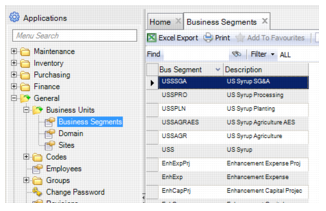
Business Segments Browse
Creating a Business Segment
Follow these steps to create a business segment:
1 Open the Business Segment browse, located in General|Business Units|Business Segments.
2 Click New and then enter the following information:
Bus Segment
A 15-character field that is used to enter a business segment code. The format of the Bus Segment field changes to display dashes, depending on the format definitions in the System Registry.
Description
Description usually includes the name of the business segment.
3 Press Enter to save.
Editing a Business Segment
To edit a business segment, click the Business Segment or Description fields and then make the necessary changes.